Showing posts with label Apple. Show all posts

Sunday, September 10, 2017

Product Review: Twelvesouth Mac Book Pro case

True story. I was flying out of Istanbul, Turkey the very day that the Trump administration's laptop controls for air travel went into effect. Of course, one of the airports that was subject to the new requirement that laptops had to be checked was Istanbul's Ataturk.

With my arrival at the gate for my Turkish Air flight to San Francisco, my Mac Book Pro was bubble
wrapped, labeled, logged, and then stacked with many others into a hardshell suitcase. Some 15 hours later that suitcase was opened at the luggage carousel in San Francisco, and dozen of laptops spilled onto the floor. I was tired. I was lazy. I grabbed my Mac, opened the lid, powered it on, and saw light. It was alive. Good enough for me. I signed the receipt and headed home.

It was not until the next day that I noticed that the case on my Mac had been cracked, Too late to seek recourse from the airline. But the lesson was learned. Even with bubble wrap, my computer was not able to withstand the rough and tumble world of airline baggage handling.

That flight from Istanbul eventually led to the purchase of a beautiful new Mac Book Pro. I also became more sensitive to the handling of my laptop while in motion. Recommendations led me to the  BookBook Vol. 2 case from twelvesouth. Made of leather, with a crush proof spine, the BookBook is custom made for the Mac Book Pro. As twelvesouth describes it:

BookBook provides six-sided protection with reinforced corners on the outside, while velvety soft, microfiber lines the interior. Zip BookBook closed and now your MacBook is disguised as a vintage book that has been proven to prevent theft. How many other MacBook cases can say that?
Do I like it? Yes I do. The leather is rich. The custom Mac Book Pro fit pleases the German engineer in me. The zippers pull smooth and easy. I am confident in the rigid protection it provides, The $79.95 price isn't ridiculous for what you get.

Please visit hardinglaw.com for more information about
Harding & Associates Family Law.  

#twelvesouth #bookbook #macbookpro #Harding&AssociatesFamilyLaw #californiafamilylaw #divorce #family law #superlawyers #americanacademyofmatrimoniallawyers #Pleasantondivorce #AlamedaCountyDivorce #ContraCostaCountyDivorce #lawyers

Friday, October 28, 2016

The New Mac Book Pro

I carry an iPad Pro for most of my mobile work. It gives me internet access, and I can download client files and take them to court with me. The Apple Pen also also lets me to take notes. However, when I anticipate a need for heavy duty computing, or when I know that I will be needing Windows software programs, I go with my 15 inch Mac Book Pro.

My Mac is my favorite computing platform. The retina display gives a large, clear, crisp view. There is no shortage of horsepower. I have Parallels installed on it so that I can run Windows programs (like DissoMaster). It just plains works!

Well, for all you Mac fans the big day is here. For the first time in four years Apple has put the Mac Book through a major redesign. It is now thinner, lighter and more powerful. It has a bigger touchpad. The screen is redesigned. The speakers are redesigned. The battery life is longer. There is now a small touch pad screen above th keyboard, that replaces function keys. This is a major upgrade and it looks like a great machine. TechCruch.com has a nice preview.


Of course, you get what you pay for. And the superior Apple product comes with the usual exhorbinant Apple price tag. The 15" version starts at $2399!

Please visit hardinglaw.com for more information about Harding & Associates Family Law 

#Apple #macbookpro #Harding&AssociatesFamilyLaw #californiafamilylaw #divorce #family law #superlawyers #americanacademyofmatrimoniallawyers #Pleasantondivorce #AlamedaCountyDivorce #ContraCostaCountyDivorce #lawyers

Friday, January 1, 2016

Refresh The Speed of Your iPhone

https://support.apple.com/en-us/HT200291

Like every computer, iPhone's can get sluggish when their on-board memory gets stuffed. Here is a little known trick to clear things out, and re-boost the speed of your iPhone.

Open the AppStore on you iPhone. At the bottom of the screen you will see the Featured, Top Charts, Explore, Search, and Updates buttons. Press any of those buttons ten (10) times in quick succession.  The screen will briefly turn white, and then the AppStore will return.

Your iPhone will now have refreshed memory, and processing speed should be improved.

Please visit hardinglaw.com for more information about Harding & Associates Family Law 

#iphone #Harding&AssociatesFamilyLaw #californiafamilylaw #divorce #family law #superlawyers #americanacademyofmatrimoniallawyers #Pleasantondivorce #AlamedaCountyDivorce #ContraCostaCountyDivorce #lawyers

Sunday, September 20, 2015

iOS Battery Drain


Thanks to kwikboost.com for this graphic!

Please visit hardinglaw.com for more information about Harding & Associates Family Law 

#Harding&AssociatesFamilyLaw #californiafamilylaw #divorce #family law #superlawyers #americanacademyofmatrimoniallawyers #Pleasantondivorce #AlamedaCountyDivorce #ContraCostaCountyDivorce #lawyers

Friday, May 29, 2015

Very Impressive iPad Trial App

TabLit Applications has relesed its TabLit: Trial Notebook app for the iPad.  I must admit, from what I have seen it looks pretty darn good. Full disclosure, since I am no longer using an iPad in court I have not purchased the app (particularly with a $90 price point). But reviews from actual users are positive and see no reason to misconstrue the product representations.  For example, the app hass:

  • Multiple levels of customizable tabs for full trial organization.
  • Pop-up windows for case notes, witness information all at your fingertips.
  • Examination outlines in true outline format, Q&A format and more...
  • Evidence checklist with witness cross-reference to examination outlines.
  • Evidentiary issue cross-reference to arguments and rules of evidence.
  • Evidence repository with photo interface for documentary and physical evidence.
  • Examination outlines
  • Examination checklists
  • Contacts list

Heck, I wish this app was available for the MacBook Pro that I do take to court. Take a look at these screen shots.


Want to learn more, please click here.

Please visit hardinglaw.com for more information about Harding & Associates Family Law

#ipad #trialapp #Harding&AssociatesFamilyLaw #californiafamilylaw #divorce #family law #superlawyers #americanacademyofmatrimoniallawyers #Pleasantondivorce #AlamedaCountyDivorce #ContraCostaCountyDivorce #lawyers

Wednesday, February 4, 2015

Tablet Sales Waaayyyy Down

As reported by USA Today tablet sales are way down, including the iPad.  According to the report: "Fourth quarter and year end tablet shipment figures . . . show that growth has nearly evaporated for the iPad, the iPad mini, and competing Samsung and others."

Let me say that I have always been a huge fan of the tablet platform. I was carrying a Motion Computing slate computer  (as they were called then) more than a decade ago. I have been singing the praises of tablets, and especially the iPad, for years. I still use my iPad frequently. However, I understand why sales are down. My iPad has never fully replaced my Mac Book Pro as my go to road warrior machine.  And now that I have an iPhone 6 Plus I can do everything on my phone that I can do on my iPad. Those are the same causes for the downturn highlighted in the USA Today article.

Are tablets going to disappear anytime soon?  I don't think so. Sales are flat but not gone. And there are millions of units out there. Apps will still proliferate, they are simply going to be written cross-platform for smartphones and tablets.

Please visit hardinglaw.com for more information about Harding & Associates Family Law 

#Harding&AssociatesFamilyLaw #californiafamilylaw #divorce #family law #superlawyers #americanacademyofmatrimoniallawyers #Pleasantondivorce #AlamedaCountyDivorce #ContraCostaCountyDivorce #lawyers

Friday, October 17, 2014

Apple's Yosemite OS X available for download

Apple's latest Mac operating system, Yosemite, is now available for free download at the Apple Store.  I am running it.  I do like the new graphics.  Speed does not seem to have changed.

Not sure why my Mac Book Pro also rings when my iPhone rings? Thinking I am going to disable this?

Please visit hardinglaw.com for more information about Harding & Associates Family Law 

#appleyosemite #Harding&AssociatesFamilyLaw #californiafamilylaw #divorce #family law #superlawyers #americanacademyofmatrimoniallawyers #Pleasantondivorce #AlamedaCountyDivorce #ContraCostaCountyDivorce #lawyers

Tuesday, September 2, 2014

Macs In The Law Office Websites/Blogs/Articles

I am really jumping on the bandwagon for Macs! With the advancement of cloud computing, and since learning of Windows Virtualization, I am now convinced that the impediments to going all Mac are gone.

If you would like to start learning about Macs in the law firm environment, or you want to learn more, here are the links to a couple of outstanding sites.

Macs In Law comes to you courtesy of Brett Burney.  It is chock full of all things Mac, iPhone and iPad.  Beyond the learning materials I also enjoy Brett's deal page -- with deep discounts and free stuff.

Also essential reading is The Mac Lawyer by Ben Stevens.  Ben gets extra kudos for the fact that he is a family law lawyer.  Like MIL, The Mac Lawyer is filled full of all things Mac, iPhone and iPad.

Here are some good articles on Macs in the law office:

The Fine Art of Practicing Law on a Mac
So You Want An All Mac Office?
Can I Use A Mac At My Law Office

For a contrary view of switching over please also consider Mythbusters: Should Your Law Firms Switch From Windows To Mac?

Please visit hardinglaw.com for more information about Harding & Associates Family Law 

#Harding&AssociatesFamilyLaw #californiafamilylaw #divorce #family law #superlawyers #americanacademyofmatrimoniallawyers #Pleasantondivorce #AlamedaCountyDivorce #ContraCostaCountyDivorce #lawyers

Saturday, August 30, 2014

FutureLawyer First To Leak New iWatch

We have all been waiting a long, long, long time for Apple's iWatch.  Rumors are that when it actually hits the street it is going to be a huge disappointment.  Well that time is now! Congratulations to Rick Georges over at FutureLawyer for being the first to report on the new iWatch. Here is the very first photo:


Click here for the story.

Please visit hardinglaw.com for more information about Harding & Associates Family Law #rickgeorge #futurelawyer #apple #iwatch #Harding&AssociatesFamilyLaw #californiafamilylaw #divorce #family law #superlawyers #americanacademyofmatrimoniallawyers #Pleasantondivorce #AlamedaCountyDivorce #ContraCostaCountyDivorce #lawyers

Friday, August 29, 2014

Running Windows Software On A Mac

Our mainline computers at the firm are Windows machines.  However, my laptop is a Mac Book Pro and my home computer is a Mac.  The Macs are superior in every way.  Better operating system, better software, better screens . . . .

We go with the Windows computers at the office because all of the legal-specific software that we use is Windows-only (for example, AbacusLaw, DissoMaster, Attorney's Briefcase).  Sucks, but that's how it is.

There is an alternative. It is called Windows Virtualization.  Parallels and VM Ware Fusion 6 are software programs that allow you to install Windows on your Apple computer, and then run Windows and all of your Windows software on that computer.  I have installed Parallels on my Mac Book Pro and it is AWESOME!


Once you have the virtualization software installed you simply click an icon and then Windows is running on your Apple machine.  Totally seamless.  It seems to me that Windows runs even better and faster on my MBP than it does on my native Windows machine -- and the same can be said for the Windows programs that I run on the Mac.

Now I can have the best of both worlds.  Windows programs and Mac Happiness.

Fusion 6 on a Mac

A couple of confessions:  In addition to buying Parallels or Fusion 6, you are also going to have to buy a copy of Windows to install on your Mac.  Your looking at more than a couple of hundred dollars.  Also, the complete installation on your Mac can be a bit challenging.  Be humble and call tech support.  With help it took me about an hour and a half to get it done.

I am going to be speaking on this topic at the Annual Meeting of the American Academy of Matrimonial Lawyers in Chicago on November 5, 2014.  Stop by and say hi!

Please visit hardinglaw.com for more information about Harding & Associates Family Law 

#Apple #Windows #Parallels #Fusion 6 #windowsvirtualization #AAML #Harding&AssociatesFamilyLaw #californiafamilylaw #divorce #family law #superlawyers #americanacademyofmatrimoniallawyers #Pleasantondivorce #AlamedaCountyDivorce #ContraCostaCountyDivorce #lawyers

Tuesday, June 24, 2014

BIGGER iPhones on the Way

As reported by Bloomberg.com, Apple is about to release two new, bigger iPhones. One model will have a 4.7-inch display, compared to the 4-inch screen of the current iPhone 5s, that may be available to ship to retailers around September.  A 5.5-inch version is also being prepared for manufacturing and may be available at the same time, the people said.

Please visit hardinglaw.com for more information about Harding & Associates Family Law

#Harding&AssociatesFamilyLaw #californiafamilylaw #divorce #family law #superlawyers #americanacademyofmatrimoniallawyers #Pleasantondivorce #AlamedaCountyDivorce #ContraCostaCountyDivorce #lawyers

Wednesday, May 21, 2014

Finally! A flash drive for Apple iDevices

How do you move files and other stuff to your iPad and iPhone?  By Dropbox?  By iTunes? By a file sharing app?  They work, but none are really all that convenient. Unfortunately, the convenience of a memory stick has never been an option -- until now!

iStick is the new USB Flash Drive with Lightning for IPad and iPhone.


Click here to check out the Kickstarter campaign.

Please visit hardinglaw.com for more information about Harding & Associates Family Law #Harding&AssociatesFamilyLaw

#iStick #californiafamilylaw #divorce #family law #superlawyers #americanacademyofmatrimoniallawyers #Pleasantondivorce #AlamedaCountyDivorce #ContraCostaCountyDivorce #lawyers

Thursday, March 6, 2014

A Moveable Office

I consider myself a true road warrior.  It all started more than eighteen years ago when I wanted to work from home so I could be around our newborn baby boy.  I have been telecommuting, remote computing, and practicing mobile from the beginning of those technological times. Who else out there can remember connecting two computers via telephone modems and pcAnywhere software?  Who else amongst us used the first generation of Paperport?  How about memories of carrying a 12 pound laptop computer around?  My memories go back even farther than that.
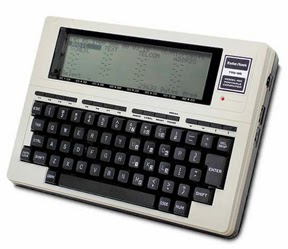
Think I am kidding?  Look at the first notebook computer I actually used in college.  To the right you see a Radio Shack TRS-80 Model 100.  It had about enough memory on board to save about a quarter of a page worth of information.  Beyond that storage was on a cassette tape drive.  I actually wrote term papers with that thing in 1984!  It retailed for about a $1000.  The only way I could afford it is because I had a buddy who worked at Radio Shack and he bought it for me with his deep, deep employee discount.
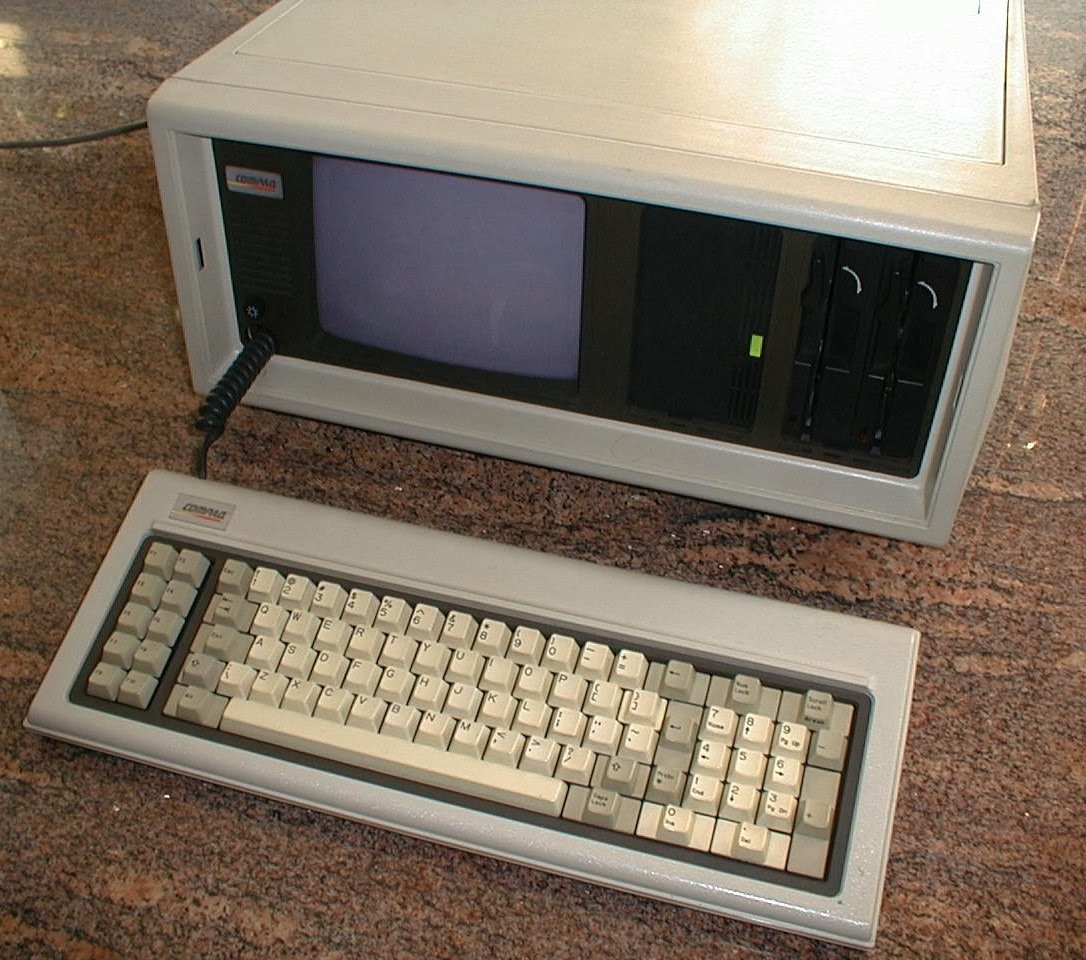
My college roommate was a computer science major, and
the portable computer he used was even worse.  Anybody remember the Compaq "Suitcase" Portable.  We ate on the floor because that beauty took up our entire kitchen table.

Of course technology evolves.  Thankfully so!  I have used it all. Smartphones, laptops, notebooks . . .

I am now down to two pieces of hardware that comprise my moveable office.  It no longer includes an iPad because my eyes are too bad to read the small screen without reading glasses.  Plus I found the small screen and finger navigation to be a handicap when I was trying to find, open, and work with documents in trial.  I can do all of the same stuff with my iPhone, and since I have to put the glasses on regardless, I have moved away from the iPad.  That having been said, I still feel that the iPad is a revolutionary, stunning, remarkable, invaluable piece of technology.  Everything that I say and do re my Mac Book Pro, below, can be done with an iPad.

What I do carry are my iPhone 5s and a Mac Book Pro Retina.
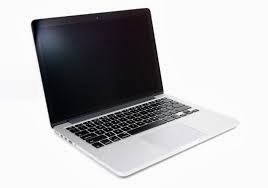
The Mac Book Pro does all the heavy lifting.  It is equipped with Word, Excel, and PowerPoint.  Sometimes as an alternative I also use Apple's Keynote for presentations, and Numbers for spreadsheets.  I connect to the computers at the office via GoToMyPC (more on it later).  I love my Mac computer!  It does everything. The screen is marvelously sharp and bright.  The processor is lightning fast.  I will never run out of hard disk space.  Most importantly the Apple operating system works all the time.  When I am computing on the road I cannot afford the glitches, crashes, and bugs that go along with Microsoft's Windows.  My Mac solves that problem.
The fact of the matter is that I really can practice with just my Mac.  So much is jammed into that machine that I want for nothing.  However, one of the joys of my Moveable Office is still the ability to connect to the PC at my bricks and mortar office in Pleasanton.  For that I love GoToMyPC. I have been using it since it was first released.  For a modest monthly subscription fee I have full access to all of the computing power at my physical office.  All of the people at our firm have the ability to work remotely thanks to GoToMyPC.  It is a fantastic capability to have.

Frequent visitors to this blog will remember that everything at my law firm is converted into digital form.  Adobe Acrobat is a workhorse in our office.  I have a copy installed on my PC at our Pleasanton office, and I also shelled out the extra $400 to install a copy on my Mac.  Every piece of paper is converted to pdf.  Because of the optical character recognition engine in Acrobat every piece of paper is also searchable.  Beyond Acrobat, every phone message/note and email is stored digitally.  Wherever I am anywhere in the world, if there is an internet connection I have access to that stuff via my GoToMyPC remote connection.  Every file in our office is at my disposal.
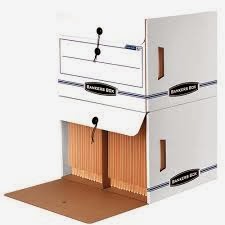
Banker's Boxes?  No Way!
When I go to trial I don't want to worry about the reliability of internet access, so I just copy the entire electronic matter file and drop it into a dedicated folder on my Mac.  Then I have the ENTIRE client file with me without having to carry a hand truck full of bankers boxes.  Of course I still carry exhibit binders and trial briefs.  However, I foresee a day when even those are eliminated once our family law courts in California get wired.

Almost all of our research is done online (in the cloud if you will).  I just log into my WestLaw Next account and I have an entire law library at my finger tips.  The couple of research programs that we have living on our computers at the office are also available to me thanks to GoToMyPC.  Again, does not matter where I am at.  All I need is an internet connection.  My Moveable Office thus includes a moveable law library.
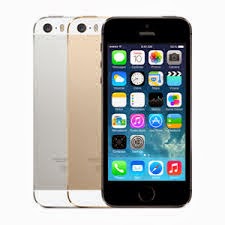
Of course you gotta have a phone and a scanner in the Moveable Office.  Mine is an iPhone 5s.  The calendar and contacts on my phone synchronize with our case management software system at the office.  Full information and thousands of contacts right there on my phone.  I have Acrobat reader installed should I need it.  A copy machine is not necessary in my moveable office.  Instead I use my iPhone (and its built in camera) as a scanner thanks to a great app called Scanner Pro.  From my friends at Readdle, this app rocks.  It is simply the best and easiest to use scanning app out there.  I also have the Hotspot feature enabled on my iPhone.  If WiFi is not available to connect my Mac to the internet, that is not a problem.  I use my iPhone as my computer's connection to the internet (we used to call this tethering in the old days).  With 4G the connection is suitably fast.
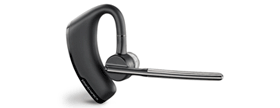
Did I mention that I also make phone calls on my phone?  I do.  Phone calls do still take place in law practice.  I like to be handsfree when I talk, but I don't care to be on the speakerphone because it diminishes the audio quality.  I use a Plantronics Voyager Legend headset.  I have tried all of the headset brands out there.  I like the Voyager because it has bluetooth, the over the ear/in the ear design fits well and stays in place, and the boom microphone provides the best audio quality.  Holding the phone to my ear is a nuisance, particularly if I need to check my calendar or review an email during the call.  The headset resolves those problems.

Speaking of phones, we still have desksets at the office.  However, we have converted to internet phones.  We are saving money because of the switch, and adding features to boot.  Our provider is 8x8.  They have an iPhone/iPad app which allows full replication of my office desktop phone on my iPhone. I can answer calls made to my Pleasanton office on my iPhone.  I can retrieve voice mail messages left at my office phone with the iPhone app.  The 8x8 service also provides fax sending and receiving, all of which can also be done on the app.

Regardless of where I am, I prfer fact to face communication.  For face to face conversations with colleagues at the office, we use Skype.  It is also our default text chat tool.  It is always on.  It is free, it is easy to use, and it is reliable.  I do not use Skype for client communications.  I don't like the idea of clients being able to call me anytime via Skype.  It is for in-house use only.  For video conferencing with clients (and also for more advanced conversations with co-workers and colleagues) I use Zoom.  This is another remarkable service.  Through a simple webcam on your computer you get high def, flicker free video and crystal clear sound.  You can schedule meetings in advance, and share screens during the meetings.  I would say that almost a quarter of the face to face meetings that I have now with clients are conducted via Zoom.
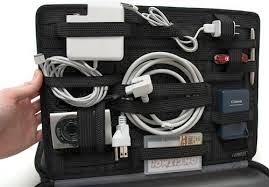

The physical plant for my moveable office? Why it is my handsome Floto leather briefcase.  This bag is the hot-diggity and I challenge anyone to a briefcase swag-off!  Of course mine has my initials branded into it, which makes me even cooler...  To keep all the wires, plugs, headsets, pens, and other stuff neat and tidy I use the GridIt from Cocoon.  The Mac weighs 4.4 pounds.  With the weight of the leather bag, the GritIt, and the accessories that I carry the average weigh in is probably seven to nine pounds.  Not too little, but not too much.  Three pounds can easily be saved by swapping out the Mac for an iPad.

There you have it My Moveable Office!

Please visit hardinglaw.com for more information about Harding & Associates Family Law

#moveableoffice #remotecomputing #telecommuting #Harding&AssociatesFamilyLaw #californiafamilylaw #divorce #family law #superlawyers #americanacademyofmatrimoniallawyers #Pleasantondivorce #AlamedaCountyDivorce #ContraCostaCountyDivorce #lawyers

Wednesday, February 26, 2014

Take A Peek At This

Peek is a new calendar app for the iPhone.  I am using it, and I am liking it.  A bit of the back story.  I like the resident calendar on my iPhone just fine.  However, there are times when the small type, and my fat fingers, can be a challenge.  Scrolling through the day, and adding and deleting events can sometimes be befuddling.


I have rolled through a host of alternative calendar apps, without much luck.  Until Peek. 


I spent the $1.99 and gave it a launch.  I have been pleasantly surprised.  Peek is just what I need.  A stripped down app that delivers the basics in a bigger size and with simpler controls.  If I want to see en entire day I can.  If I want to add or delete events I give a simple swipe and then get nice big buttons to do so. 


Peek is not an overblown, bells and whistles app.  It syncs perfectly with my iPhone calendar.  No set up.  No programming.  Just click and go. That is why I like it.


 Peek is in the Apple App Store

Please visit hardinglaw.com for more information about Harding & Associates Family Law


#Harding&AssociatesFamilyLaw #californiafamilylaw #divorce #family law #superlawyers#americanacademyofmatrimoniallawyers #internationalacademyofmatrimoniallawyers #Pleasantondivorce #AlamedaCountyDivorce #ContraCostaCountyDivorce #lawyers

Wednesday, January 22, 2014

This Would Be A Cool Smart Watch

Smart watches are the next big thing in mobile technology.  Think of an iPhone miniaturized and strapped to your wrist. Not only will smart watches tell time, they will also be phones, calendars, viewers, the whole shabang!  I am not sure how my old eyes will ever be able to see anything on them, but that is a different issue.

There are already a few on the market (Pebble, Sony, Pine) but their technology is infantile.  As with all things tech though, new prototypes are coming out all the time.  One of the coolest designs I have seen is from Todd Hamilton. Now, of course, these models are just that, models. No real hardware exists yet, but Hamilton's designs give us a flashy example of just how cool the smart watch idea can be.

Check out more of Todd's cool designs and ideas by visiting his blog.

Please visit hardinglaw.com for more information about Harding & Associates Family Law 

#smartwatch #Harding&AssociatesFamilyLaw #californiafamilylaw #divorce #family law #superlawyers #americanacademyofmatrimoniallawyers #Pleasantondivorce #AlamedaCountyDivorce #ContraCostaCountyDivorce #lawyers

Saturday, January 18, 2014

PowerPoint Presentations On Your iPad


The iPad is a nifty tool for making presentations.  I am a big fan of Apple's Keynote presentation software (for Macs and iPads).  Others prefer to stick with the tried and true PowerPoint from Microsoft.  Fortunately, if you are an Apple hardware person wanting to use PowerPoint, you can have your cake and eat it to.

Over at the ABA's Law Technology Today blog there are a series of articles detailing how you can give PowerPoint presentations on you iPad.  Click here for a look.

Please visit hardinglaw.com for more information about Harding & Associates Family Law #keynote powerpoint


#powerpointonipad #Harding&AssociatesFamilyLaw #californiafamilylaw #divorce #family law #superlawyers #americanacademyofmatrimoniallawyers
#Pleasantondivorce #AlamedaCountyDivorce #ContraCostaCountyDivorce #lawyers

Monday, January 6, 2014

Going Big or Going Small

I was sitting in court today, talking to a colleague while we were waiting for our cases to be called.  We will call my friend Tom, because that is what his name is.  Tom had on a new, fancy exercise band watch.  I noticed it, and asked for the demonstration.  He showed me how it displayed the time, and how it displayed the number of steps he had taken that day.  He explained it did other stuff, but he only knew how to work the time and the steps.  I took his word on all of this because the display on the band was too small for me to read.  Therein lies the theme of this post -- everything is getting smaller.  I have to ask, how small is too small?

Regular followers of this blog will appreciate that I am an iPad nut.  I think it is a revolutionary device.  I am also a huge iPhone fan.  And, of course, I am a huge MacBook fan!  I am also middle aged, and my eyes are getting bad.  With the New Year I have abandoned using my iPad as a courtroom companion.  I did not go with a smaller iPad Air when it was released.  Instead I put my money into a fully loaded iPhone 5s.  I now have comparable computing power in a smaller package than is offered in the iPad line.  Since I have to put my glasses on to read the iPhone and the iPad I am going with the iPhone.  I am also starting to carry my Mac Book Pro with retina display.  Yes it is heavier than the iPad, but when I have it slung over my shoulder in my fancy leather briefcase it really isn't an issue, and I have all that computing power with a 15" screen.  It is proving to be a real advantage.

I will continue to post about the iPad, it will just be with less practical application for me.  To all of those sharp, young eyes out there, touche'!

Please visit hardinglaw.com for more information about Harding & Associates Family Law #Apple #iPad #iPadAir #iPhone #MacBookProRetina #GoingBig #GoingSmall #Harding&AssociatesFamilyLaw #californiafamilylaw #divorce #family law #superlawyers #americanacademyofmatrimoniallawyers #Pleasantondivorce #AlamedaCountyDivorce #ContraCostaCountyDivorce #lawyers

Friday, November 15, 2013

Hope For The Mac Lawyer

I love Apple computers.  I have an iPad, an iMac, and and a MacBook Pro.  The iMac is at home, and the MacBook Pro is for road warrioring.  I love them all.  They work so much simpler and better than the Windows computers that we have at the office. Unfortunately we are slaves to Windows at the office because all of the law practice management software that we use only works with Windows.  Therein lies the problem for a lot of Mac lawyers -- software availability.

Slowly but surely that seems to be changing, particularly with the growth of cloud computing.  Lawtechnologytoday.org has an article detailing the increasing availability of law practice management software.  While there is still a long, long, long way to go for the Mac lawyer, any hope springs eternal.  Click here for the read.

If you are a Mac lawyer with a software resource to share, please leave a comment.

Please visit hardinglaw.com for more information about Harding & Associates Family Law #Harding&AssociatesFamilyLaw #californiafamilylaw #divorce #family law #superlawyers #americanacademyofmatrimoniallawyers #Pleasantondivorce #AlamedaCountyDivorce #ContraCostaCountyDivorce #lawyers

Thursday, August 1, 2013

Devices Going Big and the iPad Suit - Is that A Tablet In Your Pocket?

BGR, in part quoting The Wall Street Journal, says Apple is specking out a bigger smartphone screen and a 13 inch iPad screen.  These developments would appear to fall in line with the bigger is better trend hitting the mobile device world.  "Phablet" is the new buzz word in mobile devices. The combination device is intended to give tablet users a screen they can read without a magnifying glass, and a device that they call simultaneously call on.  Samsung has plans to roll out a new phablet design of its own, as does LG. Other developers will clearly follow the lead of these mobile titans.

The phablet is a hard call for me.  With middle age I now must resort to my cheater reading glasses more often. That makes using my iPhone more challenging.  At the same time, I cannot envision dropping my iPad in my pocket, as I do with my iPhone.  I could see using a phablet with a Bluetooth headset, but I cannot imagine walking around town with it pressed against my ear.  For the time being it looks like I will continue to be a two device guy.

Regarding that pocket problem I mentioned, there is a solution.  The iPad suit!  Yes, that's right. For the gentleman who wants everything there is now a bespoke tailored suit that includes a large interior pocket in the coat for the discreet storage of your tablet.  Fun stuff!

Please visit hardinglaw.com for more information about Harding & Associates Family Law

#phablet #ipadsuit #mohans #Harding&AssociatesFamilyLaw #californiafamilylaw #divorce #family law #superlawyers #americanacademyofmatrimoniallawyers #Pleasantondivorce #AlamedaCountyDivorce #ContraCostaCountyDivorce #lawyers

Tuesday, June 11, 2013

Apple iOS 7

Apple devotees always have higher than reasonable expectations for new stuff coming out of Apple's annual developers conference; and advance reviews of new operating systems from Apple are usually hyper critical.  Guess what?  Apple has announced the new iOS 7 operating system for iPhones and iPads, and the advance reviews are not all bad.  In fact, I would say this year's advance reviews are more positive than usual.  Some techies are even loving what they are seeing.


I consider Boy Genius Report (www.bgr.com) to be a fairly neutral and reliable source of tech information.  There is a series of reviews over at BGR that I have found to be particularly insightful regarding iOS 7.  Click here to check out all the fun stuff hitting the electronic highway via iOS 7 this fall.

Please visit hardinglaw.com for more information about Harding & Associates Family Law

#Harding&AssociatesFamilyLaw #californiafamilylaw #divorce #family law #superlawyers #americanacademyofmatrimoniallawyers #Pleasantondivorce #AlamedaCountyDivorce #ContraCostaCountyDivorce #lawyers

Solo nets Supreme Court win!

I know this has nothing to do with technology, but I think it is pretty cool. Andrew Simpson is a sole practitioner in the U.S. Virgin Is...