Showing posts with label Cloud. Show all posts

Thursday, January 25, 2018

Thinkin Bout Practice Management Stuff!

From Lexicata.com

If you know me, you know I love practice management systems (what we used to call case management software in pre-cloud days). Some folks still call it "case-management." That's a gross misnomer, cause the stuff does so, so, so much more. Make the mistake of asking me a question on practice management systems and I'll talk to you until your ears bleed (just ask my friend Shane who bought me coffee yesterday morning and then asked....)

Anyway, Aaron George recently written a great article at Lexicata giving an overview of the current big players in case management software. You should check it out. I agree with everything he writes.

Aaron has his own preferences, that you can read about. As for me, I place Clio and Rocket Matter (we use Rocket Matter in our practice) at the top of the heap. CosmoLex and Practice Panther are moving up the mountain with impressive strides. MyCase is an old timer that is still relevant. Abacus and Amicus? Forget about 'em.

There are some other players that Aaron does not mention, but that I will:  HoudiniEsq, Smokeball, LexRex.

Please visit hardinglaw.com for more information about Harding & Associates Family Law 

#Harding&AssociatesFamilyLaw #californiafamilylaw #divorce #family law #superlawyers #americanacademyofmatrimoniallawyers #Pleasantondivorce #AlamedaCountyDivorce #ContraCostaCountyDivorce #lawyers

Saturday, July 29, 2017

The Joys of a Home Office

Da Bear.
Therapist, Centurion,
Expert Witness on the issue of napping,
Counter Surfer
First off, I am a firm believer in the traditional brick and mortar law office. For me it is important to have a place dedicated to work and my law practice. I can control the environment. I make it louder or quieter. It is secure, and private. It gets me closer to my co-workers. Also, I firmly believe family law clients expect an office (rather than a coffee shop or a public library). I believe a physical office is an important component of a lawyer's credibility and reputation. Other lawyers will argue contra, but for me a professional office is a must.

That having been side, I also have a wonderful home office that I use a lot. Being able to get away from my traditional office can be a real refresher. There is also a sense of comfort and satisfaction in being able to work from home in sweats and a t-shirt -- while still being able to be productive. Having the dogs running around can also be very therapeutic.


So, how do I make it work?

Below is a picture of my home office. I think it is pretty nice.


Big secret: I am writing this post from that very desk.  Could have just as easily been my law office desk. Who could have known?

What's really nice about my home office?
  • That wall of bookshelves in the back is what makes it. Plenty of storage to keep the space clutter-free. Also pleasing on the eye.
  • I have a Google Home device on the shelves to the right (a thank you gift for serving as President of the Northern California Chapter of the American Academy of Matrimonial Lawyers) so I can listen to music, check the weather, check traffic, etc.).
    • Jazz makes life so much better!
  • The windows let in light and fresh air.
    • Take a deep breatttthhhhhh....

What's functional about my home office?
  • The desk provides a large work surface.
    • I love the wood. My wife hates it because I bought it a Cost Plus.
  • There is a full-size, all-in-one, wireless printer/scanner/copier on the shelves to the left.
    • Can't tell you how many times I have had to print something before leaving for court.
      • Make sure you have plenty of extra paper and toner. That stuff tends to run out at the worst times.
  • I have a Mac (with its Giant screen) installed on an Ergotron adjustable platform. With it I can have a stand-up computer when I want it, or I can drop it down to desk level.
  • Google Wi-Fi allows for connectivity of everything
    • So nice not having a web of tangled wires laying around


Then there is the technology that really brings it all together.
  • Telephone.
    • At my brick and mortar office we have a VOIP telephone system from 8x8. 8x8 also has a virtual office app for smartphones, and virtual office software you can install on your c computer. I have it installed on my iPhone, my Mac, my Mac Book Pro. With the app I can forward office calls to my iPhone and computers. I can retrieve office voice mails from my other devices. The iPhone connects to the wi-fi network so that spotty cell coverage is a non-issue when making and receiving calls. No one on the other end of a phone call could ever guess I was not in the office.
      • Our 8x8 service also includes faxing, although faxes have pretty much gone the way of the Do-Do bird.
  • Mac Book Pro. Goes with me everywhere. Sitting on the desk at home it gives me a valuable second computer and monitor. Also gives me a change of scenery if I want to move away from the Mac.
    • Actually typing this blog post on it.
  • If I want a third computer or a third monitor, out comes the iPad Pro with keyboard.
  • Legal pad. Yep, there it is on the desk next to my laptop. 
    • Still gotta be able to jot things down...
  • The Cloud. Our law firm is almost entirely Cloud based. As such, I can work anywhere I have internet. Our Cloud system includes:
    • Office 365 for so, so, so much:
      • Multiple-platforms means full functionality on desktop computers, laptop computers, iPads, iPhones . . . . Anywhere, and on any device I've got:
        • Word
        • Excel
        • Outlook
          • A huge advantage being able to send, retrieve, and index emails from anywhere
        • Sharepoint. An online repository for all client files.
          • Like taking the office file cabinets with me wherever I go. Again, a huge advantage.
    • Rocket Matter
      • Simply the best practice management system out there! On every device I have all my contacts, cases, calendars, billing, documents and records. The list goes on and on....
    • Skype for direct, real-time communication with office colleagues. 
      • It's the modern intercom with video.
      • And, it is included with our Office 365 subscription.
    • LogMeIn. Occasionally I will need to get on my desktop PC at my law office. LogMeIn let's that happen.
Virtual lawyering, home lawyering, remote lawyering, satellite lawyering, smart lawyering . . .  Call it what you want, a home office can be a real treat! With a couple of exceptions, it can be a duplicate of your regular office, Mine is pretty fancy. It can just as easily be a folding chair and table and a laptop in the corner of an apartment (or even less). Change is good. A home office is a great change of pace for me.

Please visit hardinglaw.com for more information about Harding & Associates Family Law #Harding&AssociatesFamilyLaw #californiafamilylaw #divorce #family law #superlawyers #americanacademyofmatrimoniallawyers #Pleasantondivorce #AlamedaCountyDivorce #ContraCostaCountyDivorce #lawyers

Thursday, May 25, 2017

Office365 is Micrososoft's Future

Jeff Bennion is a lucid law practice technologist. The writing on his virtual wall says Office365 in Big Letters. This week he posted a great article on Above The Law. In the article Jeff makes the following observation:
For years now, Microsoft has been acquiring companies and integrating them with Office 365 and Windows 10 to let you do more from places other than your desk. For example, the new Timeline feature takes advantage of the artificial intelligence working in the background of Windows, and lets you start a document at work, and when you pick up your cell phone or go to another computer it will ask you if you want to pick up where you left off, regardless of whether that file is on your computer. If it’s not on your computer, it downloads it and you can get to work seamlessly.
Jeff also notes the upcoming release of new Surface computers from Microsoft:
So, today [May 23, 2017] Microsoft is having its conference in Shanghai to announce new Surface computers. What does that mean for lawyers though, whose Outlook calendars and pleading templates work just as well on a fourth-generation Intel i5 than on a seventh-generation i7? Does it really matter what the new computers are and how fast they can do things?
The answer is yes, but not because we need faster, better computers. It’s because between the hardware changes that are coming and the software changes, manufacturers are rapidly trying to change work culture to encourage mobility and remote working. We are right in the middle of a huge work culture change, which includes law practices, and it’s being driven in part by these new things coming out.
Jeff is giving us lawyers a heads up that we have to start getting ready now for the inevitable transformation of computing to the cloud. His big statement:  We are going mobile.
The Death of the DesktopIt is my prediction that desktop computers in the office will be gone in five years. As we’ve seen in big law firms, more law firms will rely on employees working from home. That will be hastened by the technology that is allowing that transition to happen more smoothly. 
This message does not come as a shock to me. As someone who has been telecommunting for three decades, the pattern makes sense. People are mobile. Why shouldn't our computing platforms be able to follow us, rather than tying us down. Mobile technology equals convenience. Convenience equals efficiency. Efficiency makes for better performance, be it sales, writing, practicing law, anything!


Get ready folks, the transformation will be a lot easier if you go with it rather than fighting it. If you are not already there, you need to start looking to the cloud. If you are a Microsoft Word of Excel addict, you better start learning more about Office365.
Please visit hardinglaw.com for more information about Harding & Associates Family Law 
Please click here to read the entirety of Jeff's brilliant article.

#Harding&AssociatesFamilyLaw #californiafamilylaw #divorce #family law #superlawyers #americanacademyofmatrimoniallawyers #Pleasantondivorce #AlamedaCountyDivorce #ContraCostaCountyDivorce #lawyers

Tuesday, May 2, 2017

Office 365 Report

Well, it has been a couple of weeks since we implemented Microsoft's Office 365 Business Premium. On the whole I would say I am most enthused. Having all Microsoft Office products (Outlook, Word, Excel, etc.) on all of my hardware is great! Likewise, being able to go live with Outlook regardless of device or location is a huge convenience. And for $12.50 per user per month, you cannot beat the cost!

Remember we made the switch after Rocket Matter -- our Great practice management software -- released its Office 365 integration features. Those new tools are also proving to be a great addition to our practice, particularly the new email integration tools.

Of course, we are talking about Microsoft here, so I am not going to say everything has been problem free. Office 365 requires a new way of thinking, and it has been mind numbing at times. I have bought books and reviewed dozens of blogs and chat groups as part of the learning curve. Of course, there are also hiccups. We have not completely moved all of our files to the cloud because we are still struggling with some Sharepoint and OneDrive formatting requirements. We are still getting used to finding those cloud based files and documents. While in court yesterday I tried to review some pleadings on my iPad. It did not go as smooth as glass. With time there will come familiarity. I am not worried.

I have been a proponent of maintaining a mobile practice for decades. Office 365 is a major development in that regard. It was the right move to make.

Please visit hardinglaw.com for more information about Harding & Associates Family Law 

#Microsoft #office365 #Harding&AssociatesFamilyLaw #californiafamilylaw #divorce #family law #superlawyers #americanacademyofmatrimoniallawyers #Pleasantondivorce #AlamedaCountyDivorce #ContraCostaCountyDivorce #lawyers

Monday, April 10, 2017

Migrating to Office 365

Regular readers will remember that about a year ago we made a major shift to our case management when we migrated from AbacusLaw to Rocket Matter. The move was not without its hiccups, but we are thrilled with Rocket Matter. It is a cloud based system. Updates come often. It is reliable and innovative. They are still ironing out their credit card interface, but that too is impressive as it improves. I have become a huge Rocket Matter booster!  The latest major innovation from Rocket Matter is its ability to integrate with Microsoft Office 365.


Microsoft has been pushing 365 for about a decade as it has determinedly pushed cloud based computing. For a decade I have resisted because of internet security concerns, and because it usually takes Microsoft a decade before its product(s) evolve to a point of reliability and efficient usefulness. I started researching 365 on my own about a year ago. I did not make the switch because I was still nervous. However, 365's security now gets endorsements from all the major bar associations and legal techies. It has evolved to be a pretty good Mac application. A lot of the customary Microsoft bugs and wrinkles have been ironed out.


With the new Rocket Matter 365 integration I have decided to make the switch. If all goes as planned the technology side of my practice will be entirely cloud based. All case management. All document handling. All file storage. All libraries. With Rocket Matter and 365 I will be able to access my entire office from my desk at the office, from my Mac Book Pro when on the road, and from my Mac at home. The idea of remote computing by logging into my office computer with a connection like LogMeIn or GoToMyPC will be unnecessary. I will have the full slate of Microsoft applications (Outlook, Word, Excel, PowerPoint, OneNote . . . .). All of the programs will feature the latest version. There will be no software maintenance for me, I will have 1 Terabyte of cloud storage. All of my files will be available to me anywhere and everywhere. And I get it all for $12.50 per month per user! WOW!

If things go as planned, I will be able to track and add time to my Outlook emails, sync contacts and calendars automatically on all my devices, upload documents and files, leverage full document versioning, and so much more. The prospects make me giddy!

Of course, the dreams rarely correspond with the reality. The transition is underway. I have installed the Office 365 apps on all my devices. Today we migrate our data and email. I am working with a consultant recommended by Rocket Matter. I will let you know how that goes. Stay tuned!

Please visit hardinglaw.com for more information about Harding & Associates Family Law 

#office365 #rocketmatter #Harding&AssociatesFamilyLaw #californiafamilylaw #divorce #family law #superlawyers #americanacademyofmatrimoniallawyers #Pleasantondivorce #AlamedaCountyDivorce #ContraCostaCountyDivorce #lawyers

Wednesday, February 8, 2017

An Update On The Cloud


Not only is cloud computing the wave of the future, it is the crashing surf of today. Rather than trying to reinvent the wheel, I want to steer you all to a great update article from Above The Law.com. There Jeff Bennion give you his latest, greatest information about the most celebrated cloud providers: Google Drive, Microsoft One Drive, and Dropbox.

Did you know that "Google Drive has added several new features, including the ability to preserve your data when you get an ediscovery hold (lawyers don’t usually get ediscovery holds for their own files, but it’s important to know about this if your clients get an ediscovery hold and they are using Google Docs), and built-in voice typing into documents."? Were you aware that "Dropbox has been working on a project called Paper, which is a collaborative note-taking application like Evernote and OneNote. So, it’s a shared virtual whiteboard to jot down notes and sketches."?

All this information, and more, is available by clicking here!

Please visit hardinglaw.com for more information about Harding & Associates Family Law 

#cloud #cloudcomputing #cloudplatforms #googledrive #onedrive #dropbox #Harding&AssociatesFamilyLaw #californiafamilylaw #divorce #family law #superlawyers #americanacademyofmatrimoniallawyers #Pleasantondivorce #AlamedaCountyDivorce #ContraCostaCountyDivorce #lawyers

Friday, December 30, 2016

Lawyers Must Know Technology

As we head into 2017 you must acknowledge technology is not an option in your law practice. It is also not optional that you know technology as a practicing lawyer. Think about it for a minute... How can you create an effective discovery plan in your divorces cases if you don't know about online banking and online finance programs like Quickbooks? How can you effectively adjudicate all the issues n your case if you don't know how to find all the facts? How can you cost effectively deliver legal services if you are not computer savvy? How are you going to communicate with your clients if you don't use email?

If you think you don't need to know technology, then you don't know about practicing law. nowadays. Technology wisdom is no longer on the horizon. It is under our feet, on our desks, in our heads. It has been here since yesterday, and you need to embrace it and know it now!

If you don't believe me, then pay attention to the state bars. They are compelling you to know technology. The State Bar of Florida has amended its CLE rules so that they now require three hours per cycle of technology training. Given how pervasive tech it is in our world, it is only a matter of time before all state bars with have similar rules.

Also pay attention to your malpractice carriers. Those risk management brochures they send you are now filled with warnings compelling us to learn about and implement technology. Malpractice applications now include technology questions.

In your divorce practice do you request data from the opposing parties computer? Are you researching social media use by the opposing party? Do your requests for job search logs include data from job websites? No. Why not? Here is my suggestion for your list of 2017 resolutions:  Start thinking about, using, and investigating technology in your practice. It is not just about word processing anymore...

Please visit hardinglaw.com for more information about Harding & Associates Family Law 

#technology #CLE #Harding&AssociatesFamilyLaw #californiafamilylaw #divorce #family law #superlawyers #americanacademyofmatrimoniallawyers #Pleasantondivorce #AlamedaCountyDivorce #ContraCostaCountyDivorce #lawyers

Friday, July 15, 2016

My Updated Thoughts On Cloud Computing

I have always been a staunch advocate for the idea of buying software and installing it in your office, and a skeptic of the idea of cloud computing. I thought cloud software was renting software, and that added to the cost, allowed the software vendors to hold the customers hostage, and subjected data to security vulnerabilities. I am starting to change my mind.

Cost. The cost for software will always be there. Software companies, like all businesses, exist to make a profit. My fear that cloud software systems could exploit the customer is still a real concern but not anything that can be avoided even if you have a server based system. I do believe the price point for cloud software is higher than purchased software. Regardless, it is going to cost you money. As I learned recently with the corporate changes at AbacusLaw, what that company did was triple its support rates, support that you have to have to keep the software that you bought running. To make sure you buy their new stuff, Microsoft just stops supporting older products, period. That is similar types of exploitation.The cost of keeping software is just a cost of doing business.

Security. I was fearful that the target sites for my cloud computing would not be secure enough to keep out hackers. Well folks, there is no such thing as an impervious computer system, be it server-based or in the cloud. Right now, somewhere there is some teenage kid, or some foreign government agent trying to hack in to my system and yours. Given the bank grade security that exists on all reputable cloud providers, you are probably safer in the cloud these days then you are out of it.

Convenience. This is the big life changer for me. Now that our law library and practice management system are 100% cloud based I have been reborn. I have zero software maintenance. No updates to install. No bugs to rectify. Maintenance happens who knows where in the middle of the night, with no meddling from me. I just show up at work and stuff works. Awesome.

Innovation. I am finding that improvements and innovations are constantly rolling out on our cloud products. Rather than focusing on one huge annual upgrade, vendors can constantly tweak their products and make them better. Heck, a new weekly feature that is bug free is a whole lot better than the annual beta testers, and subsequent patches, that I am used to getting.

Timeliness. Because products and information can be updated instantly cloud software is fresher. No longer do I have to wait for an annual CD with all the year's cases on it. I get them online the same day that they are published by the official reports (sometimes even faster than that)!

Platform Blind.  Because my cloud software is accessed through a browser, it does not matter what kind of computer I am using. Be it a Mac, a PC, an iPad, a Google Chrome or Android device, it all works the same. We have always run PCs at the office because our software compelled it. At home I run Mac products because they are better. Now it makes little difference.

Mobility. All I need is the internet, and Boom I am working. No internet you say? Okay, no new issue there. My old way of doing things was to use remote computing software (GoToMyPC or LogMeIn) to access my office computer and run the software on it. For that to happen I still needed the internet.

I am diggin the cloud, and I bet you will too!

Please visit hardinglaw.com for more information about Harding & Associates Family Law

#cloudcomputing #Harding&AssociatesFamilyLaw #californiafamilylaw #divorce #family law #superlawyers #americanacademyofmatrimoniallawyers #Pleasantondivorce #AlamedaCountyDivorce #ContraCostaCountyDivorce #lawyers

Thursday, June 30, 2016

Thank You for the Therapy

Thank you to the two readers of this blog who called me in response to yesterday's post, and referring me to their merchant services providers.  I appreciate the contact and the therapy.

Here's what's funny, one of those friends told me I should open a merchant account with Intuit.  That's funny because, as I mentioned briefly in yesterday's post, I have an Intuit merchant account.  It works great! For some mad reason I made the decision to move away from it!

Thank you also to the kinds folks who emailed me privately offering their sympathies.  Clearly folks are interested, and lots of family law lawyers are still mystified by the idea of receiving credit card payments, so here is my daily update.

I also want to thank Larry Port, the CEO of Rocket Matter.  He reached out, apologized profusely for all the problems, and promised they would be fixed. How many of you have ever received a personal reach out from the Big Boss at a software company?  Not too many, I am sure.  Now I am thinking Bill Gates is going to get in touch about my Windows issues.  Anyway, I appreciate Larry's reassurances, and I believe him.  In fact, if you make it to the end of this post, you will see that things may be improving.  In the meantime our travails do give me a divine comedy of content here!

The curtain lifts, the music rises from the orchestra pit. The players are in place. Act 2 begins:

When I arrived at the office today I found some emails from Forte. Yesterday I explained that I had never heard of Forte, but they apparently have something to do with TouchSuite? The emails requested that I log into my virtual terminal and complete its setup.  I did not know what a virtual terminal was?  I did not know I had a virtual terminal? I did not know that I have a Forte account? Why did I not know? Because no one from TouchSuite has ever educated me to any of these facts.

Anyway, I followed the links to setup my Forte something or other.  Of course, the links did not work. So I called Forte customer service.  After being on hold for 20 minutes I finally got a human being. In the spirit of full disclosure she was very, very nice, and very, very helpful. We solved the log in problem by clearing the cache on my browser, and got the accounts set up.

I then asked her what Forte was (probably should have asked that question first)? She explained to me that Forte was my merchant service provider.  That's interesting. I thought TouchSuite was my merchant service provider? No, she explained, TouchSuite is just a sales company; they sold our service to you.  Hmmnn. How do you like them apples....

Anyway, she also explained that we had just set up a virtual terminal so that I could process client payments via Forte's website.  Cool I thought, then I look at the details on the screen and saw that it was for echecks, but not credit cards.

I asked her
"How do I process credit cards?
She politely told me "You can't. Your account is not set up for credit cards."
"How can I add credit cards" I asked?
"You have to call TouchSuite."

Aargh. Not the answer I wanted.  Anyway, back to our conversation:

"While I have you on the line, I am curious how much in dollar amounts can I run each transaction for?"
"$7000" she answered.
"$7,000?  When I had my initial conversation with TouchSuite weeks ago I told them my ordinary minimum transaction would be $10,000 and that some transactions could run as high as $30,0000 to $50,000!"

Be reminded the women I am talking is an absolute saint. Very patient and very helpful (thank God).

"I am sorry Mr. Harding, if you want to run more than $7,000 we are going to have to send you an application to see if we can get your limit increased, or you might want to call TouchSuite.  Here is the name of your sales rep at TouchSuite that we have listed for your account . . . ."

"Thank you" I said, "I will give TouchSuite a call."

Next I called TouchSuite, ran through the phone tree and as usual got a voicemail box. I left her a message. In all the times that I have called TouchSuite no human being has ever answered the phone.

Next I called RocketMatter to talk the to service rep who has been assigned to me to try and solve this disaster. Got his voicemail and left a message.

So, where are we? (1) I can now apparently process echecks by logging into my Forte account. (2) I cannot process echecks through my Rocket Matter time and billing.  (2) I cannot accept credit card payments period. (3) Whether it would be an echeck or a credit card, it can only be for $7,000 when my ordinary minimum transaction is $10,000.  (4) As usual no one is answering the phone at TouchSuite. (5) Waiting for a call back from Rocket Matter. (6) Bills are supposed to go out tomorrow, but there is no way for the clients to pay them.

Rocket Matter to the rescue!  There is a guy at Rocket Matter support by the name of Michael. Love the guy. Drinks the same happy/helpful juice that is poured into the cups of all the support folks at RM. He knows his stuff, and when he doesn't know something he goes to working figuring it out.  I whined and moaned. Michael listened. Then he came up with solutions.

We think Forte is only responsible for processing echecks. Michael and I did a test. I billed myself a dollar, and then paid for it with an echeck. We have to wait a couple days for the check to post. If it does, we are as good as gold on the echeck side.

We think TouchSuite actually does run the credit card side of things, and is not in fact just a sales force for Forte. I met with a client today who is a sales director for one of the world's biggest credit card procssing companies.  She agrees with Michael on this point, and that TouchSuite is actually, and Forte is not actually, processing the credit cards. Michael is going to reach out to TouchSuite to confirm. Assuming this is all accurate, we will then be good as gold on the credit card side!

So, things are looking up!  I can tell you this, once we do get the system working as designed it will be BRILLIANT!  It will be a huge, huge, huge step up from Abacus Accounting. I really am quite excited!

Please visit hardinglaw.com for more information about Harding & Associates Family Law 

#RocketMatter #TouchSuite #merchantaccount #creditcards #Harding&AssociatesFamilyLaw #californiafamilylaw #divorce #family law #superlawyers #americanacademyofmatrimoniallawyers #Pleasantondivorce #AlamedaCountyDivorce #ContraCostaCountyDivorce #lawyers

Wednesday, June 29, 2016

The Rocket Matter Winning Streak Has Run Out

I had previously written about how thrilled I was with the time and billing features of Rocket Matter. That excitement was based on the one invoice that I had sent to one client, and that appeared to have been processed effortlessly. Ooops. It seems that I was a bit premature with my enthusiasm.

When I received the sales pitch from Rocket Matter ("RM"), great emphasis was placed on the Rocket Pay component of the system. Rocket Pay is what we might otherwise call a merchant account. You use it so that the clients/customers can pay you with credit cards. As described to me by the RM sales folks, my clients would get an email invoice. In that invoice there would be a link the clients could click on so that they could pay their invoices with a credit card or an echeck (echecks is a newish for me and my clients, and very exciting feature). Awesome. It would all be done under one roof, and I could then close my current merchant account with Intuit/QuickBooks.

In concept the process is great. In actual implementation and operation, Not So Greattttt.....

Turns out that RM has a partner company that handles the merchant services side of Rocket Pay. Partnering is quite common. I partner in my practice all the time. I use contract attorneys. I use a subpoena service to obtain records. RM is a technology partner. Unfortunately for Rocket Pay that technology partner, a company called TouchSuite, is where the problem starts and continues. I had not actually surveyed that first client that I wrote about before I posted my earlier review. Turns out she first tried to pay her bill with a credit card. The card was repeatedly rejected by Rocket Pay. So, she (we thought) then paid by echeck. I saw the payment posted in RM, and started doing my happy dance.

After a couple of weeks my client got back to me. The money she had "Paid" for her bill had not been withdrawn from her checking account. She was finding the delay distracting. Did I mention she is a lawyer? And she was questioning the efficiency of the new software system that I had been touting to all my clients. Something along the lines of my clients would never put up with such a horrible system... Can you say Unhappy Client?

I got on the phone with RM technical support. As always the tech support folks at RM were fantastic. They started working with me immediately to find out what was going wrong. With similar immediacy, we learned the problem sourced back to TouchSuite. Turns out the ability to actually pay by echeck Does Not Exist!  All the buttons are in place, the link works, but the actual system to make it happen has not been implemented by TouchSuite! The payment was credited to the client in RM, but the money will never appear in my bank account! How do you like that for partner communications. RM is selling a product that its merchant services partner does not even provide! And I am working for clients for free!

Not questioning why, but simply committing to fixing it (as any great customer service company would, and as I have promised my disgruntled client) the folks at RM started working on a fix. Still don't have an answer on how we undo the client payment that will never be received, but the folks at RM will figure that out. Unfortunately any complete fix will require the involvement of TouchSuite, and here is where I am at with them.

When I starting installing RM I went through the merchant services application process with TouchSuite. Mind you I have been through this twice before with other merchant accounts. The last time was with Intuit, and it took ten minutes. The application process with TouchSuite was overwhelming. It spread out over days. I thought I was applying for access to Fort Knox, the White House, and the Vatican all in one. Eventually, or so I thought, the application process was completed and approved. I was wrong!

From what I understand now TouchSuite failed to timely process the application at its end. Apparently there is some other company called Forte that receives the application and processes it further? So, I got to repeat the application process. TouchSuite did fill in most of the information on the application for me so that all I had to do was sign it.  Guess what? They filled in the application wrong, and it was again rejected by Forte!

It looks like we are now on Round 3 of submitting stuff TouchSuite and then to Forte. I got to spend the better part of yesterday trying to re-apply only to have processing links fail, emails sending me to non-existent destinations, one person at TouchSuite having me do one thing while another person at TouchSuite was having me do something else... What the heck, it doesn't matter. The alternative would be me working on client matters that I will never get paid for....

Where are we right now?  Who knows? We have been testing RM for two, three months now. We closed out all of our Abacus Accounting matters yesterday, and were intending to go 100% live with RM this week. The plan was to send out our first full set of RM bills to all of our clients on July 1. Does not look like that is going to happen. I wonder if my mortgage company will give me extra time to pay my bill when I tell them my TouchSuite dilemna?

By the way, I still have plenty of love for the tech support folks at RM. Absolutely extraordinary! If I did not know that they were working over the top to make things right I would have jettisoned the whole system yesterday. I will say this, I have never been more impressed by a technology company's tech support than I am with RM.

Please visit hardinglaw.com for more information about Harding & Associates Family Law 

#RocketMatter #RocketPay #TouchSuite #Harding&AssociatesFamilyLaw #californiafamilylaw #divorce #family law #superlawyers #americanacademyofmatrimoniallawyers #Pleasantondivorce #AlamedaCountyDivorce #ContraCostaCountyDivorce #lawyers

Thursday, April 14, 2016

Dropping AbacusLaw

Unfortunately my recent misgivings about AbacusLaw seemed to have been warranted. The sales department recently contacted me to advise that my annual service agreement would be expiring and that renewal would be at at roughly a 100% price increase!  Also quite frustratingly the tech support department has taken a rapid turn for the worse. Four of my last five calls to tech support have been answered by brand new techs who know nothing about the program. My calls have resulted in me sitting and watching the remote sessions as the techs clicked around my computer learning the program, and repeatedly putting me on hold so they could (presumably) receive training from a supervisor. Suffice it to say that in the last two months my customer satisfaction quotient has gone way, way down.

That got me looking for other options.  I called colleagues for recommendations. I skowered the internet. I came up with a list. It included MyCase, CosmoLex, HoudiniEsq, Rocket Matter, Clio, Practice Panther, Perfect Practice, and Firm Central.  All of these are cloud based products, as compared to the AbacusLaw that I am currently running from my own server. Given that maintenance on the AbacusLaw that I have installed on my server would soon cost more than any of the above listed cloud products the time finally seems right to move my practice management to the cloud.

Next I started signing up for trial versions and demos (or at least trying to sign up, as I shall explain).

Clio is a program I have been following for years. I love the interface, and it has rules based calendaring which is a HUGE plus. Unfortunately the on line reviews I found were not encouraging: repeated price increases and abysmal customer and technical support. My call to the sales department did nothing to contradict those reviews. I contacted the sales department to do a little brain picking, and to find out if they have hosted demos, or if I could have a conversation with someone about the product.  I was told they don't do either, and that I should just sign up for the free trial and play around with it for a while. Scratch Clio from the list.

Firm Central is the product Thomson Reuters has released. From what I could see on the website it looked awesome. The reviews I found were also very flattering. I called TR sales. I was told that no questions could be answered overe the phone and that my dedicated sales rep would have to call me. I then asked how I could make that call happen. The telephone sales rep asked for my account information and then put me on hold. I am not kidding here, 5 minutes later he got back on the line, told me he could not figure out who my sales rep was and then suggested I call back later when they were less busy.  Wow! Being determined, I did call back. The second time the telephone sales person took down my number and said my sales rep would give me a call. A week later, still no call. Scratch Firm Central from the list.

CosmoLex, HoudiniEsq, and Perfect Practice all looked like great products, Each was a bit more complicated than I would like, and I just didn't comfortable as I was playing with them. Scratch them from the list.

That left me with live, sales department hosted demos of MyCase, Practice Panther, and Rocket Matter. Each of the demos was great. The sales reps working with me were all top notch. They knew their products, they wanted to help me, and they were each very enthusiastic.  I could have easily settled on any of the three products.

MyCase was my leading contender heading into the demos. I have many friends who swear by it. The company is a real moving and shaker in tech circles. I wanted it to be my winner. Two things eliminated MyCase. First it has also (like AbacusLaw) gone through the merger and acquisition cycle recently. The parent company has also gone public. That usually means dollars before customers while it finds and solidifies itself. I don't need that anxiety. Second the email integration components of the product were lacking. Given that probably 90% of my law firms communications are by email, that was the real deal breaker. Scratch MyCase from the list.

Practice Panther was the real surprise! It is an easy to use, graphically pleasing program that I really liked. I scratched it from the list because, unlike MyCase and Rocket Matter, it does not include document storage as part of its program.  Instead you have to integrate with box, and use it as your storage portal. Criticize me if you will, but I just don't like box. It does not play nice with me. I have repeatedly tried to make it work for me (including while testing Practice Panther) and it just has not worked. Plus I did not fancy the idea of paying for a box subscription in addition to the Practice Panther subscription. Scratch Practice Panther from the list. I will say this though, had it not been for the box issue Practice Panther likely would have been my winner.

That leaves us with Rocket Matter, and that is the company I signed up with.  How is it going? That is for future posts. Stayed tuned....

Please visit hardinglaw.com for more information about Harding & Associates Family Law 

#Harding&AssociatesFamilyLaw #californiafamilylaw #divorce #family law #superlawyers #americanacademyofmatrimoniallawyers #Pleasantondivorce #AlamedaCountyDivorce #ContraCostaCountyDivorce #lawyers

Friday, October 31, 2014

Tips For Going PaperLess

Ernie Svenson is a New Orleans lawyer whom I have been internet stalking for years.  Ernie was one of the pioneer lawyers when it came to implementing internet technologies in the practice of law.  He has generously shared his wisdom on social media, technology, software (particularly Adobe Acrobat), and practice management process.

His most recent foray is in the area of going paperless.  Along with countless seminars, internet articles, and interviews he has spread the gospel on teching out your practice while saving trees. Along with Andrew Legrand, Adriana Linares, and Megan Hargroder he has even turned it into a business.

PaperlessChase.com is Ernie's (and friends) mother ship for learning how to make your law office 100% mobile –no more papers, no more filing cabinets, no more faxes, no more printing out stuff just to sign it (use your iPad or Acrobat and email it). It, and they, will help you do everything faster. There are hardware reviews, tips and tricks, newsletters and mail lists.

Here is an example of what they do. Visit the website. Look at it. It's beautiful. It's clean. It's hypnotic. It cost $500 to create! How? By hiring a virtual assistant to do the work. That's great information, and I got it for free by visiting PaperlessChase.com. The site also offers CLE classes, a free white paper on going paperless, and much more.

This blog, Family Lawyer Tech & Practice, is all about practicing law better and more efficiently. PaperLessChase is right there with us. Treat yourself to a visit!

Please visit hardinglaw.com for more information about Harding & Associates Family Law 

#Harding&AssociatesFamilyLaw #californiafamilylaw #divorce #family law #superlawyers #americanacademyofmatrimoniallawyers #Pleasantondivorce #AlamedaCountyDivorce #ContraCostaCountyDivorce #lawyers

Wednesday, April 23, 2014

Dropbox For Lawyers

58% of law firms now use Dropbox for cloud storage of documents, files, photos, whatever.  Thanks to our friends at Lawyerist.com there is now a Dropbox user guide for Law firms.  Replete with videos and written instructions, this is a great resource for lawyers new to Dropbox, and for the veteran Dropboxers looking to expand their experience.  Great stuff!  Check it out by clicking here.

Please visit hardinglaw.com for more information about Harding & Associates Family Law 

#dropbox #dropboxforlawyers #Harding&AssociatesFamilyLaw #californiafamilylaw #divorce #family law #superlawyers #americanacademyofmatrimoniallawyers #Pleasantondivorce #AlamedaCountyDivorce #ContraCostaCountyDivorce #lawyers

Thursday, March 6, 2014

A Moveable Office

I consider myself a true road warrior.  It all started more than eighteen years ago when I wanted to work from home so I could be around our newborn baby boy.  I have been telecommuting, remote computing, and practicing mobile from the beginning of those technological times. Who else out there can remember connecting two computers via telephone modems and pcAnywhere software?  Who else amongst us used the first generation of Paperport?  How about memories of carrying a 12 pound laptop computer around?  My memories go back even farther than that.
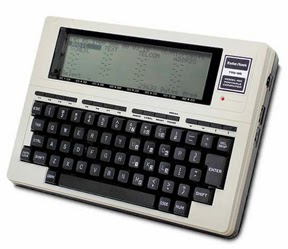
Think I am kidding?  Look at the first notebook computer I actually used in college.  To the right you see a Radio Shack TRS-80 Model 100.  It had about enough memory on board to save about a quarter of a page worth of information.  Beyond that storage was on a cassette tape drive.  I actually wrote term papers with that thing in 1984!  It retailed for about a $1000.  The only way I could afford it is because I had a buddy who worked at Radio Shack and he bought it for me with his deep, deep employee discount.
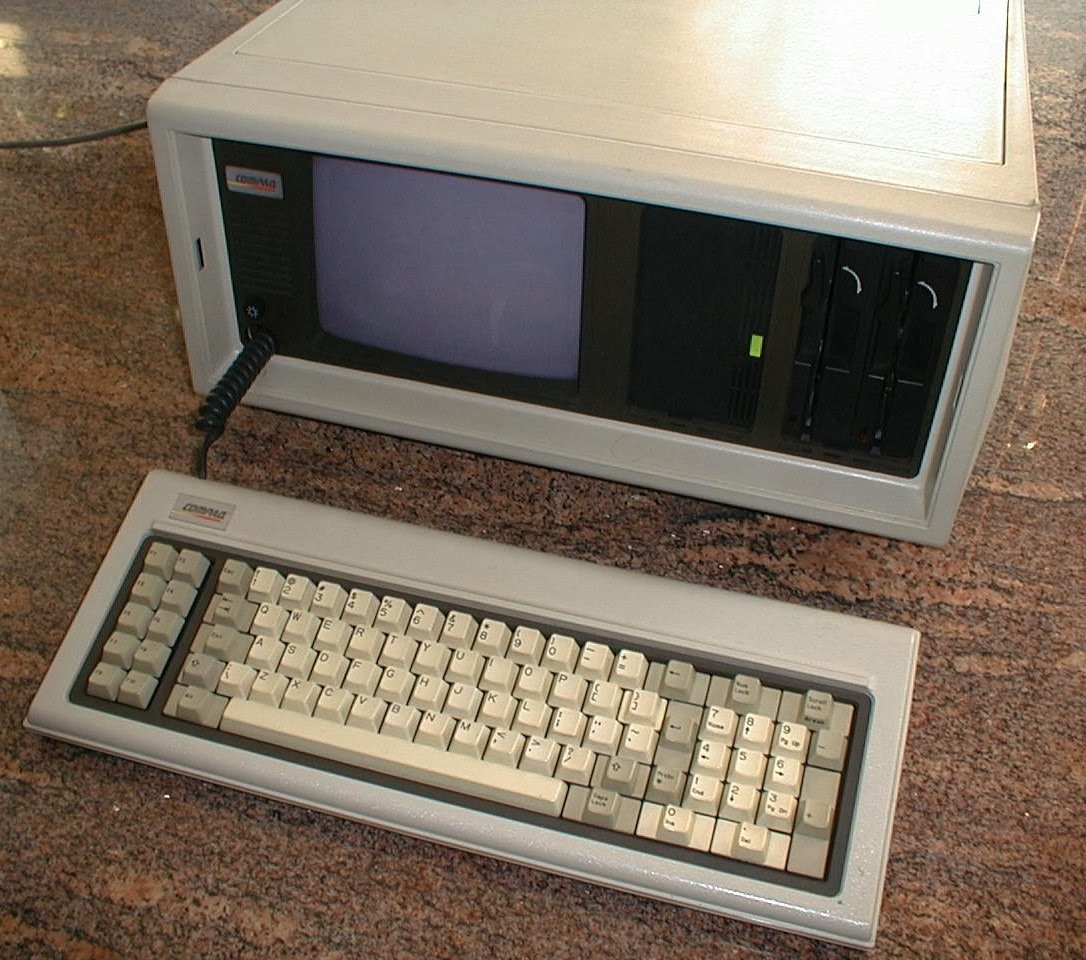
My college roommate was a computer science major, and
the portable computer he used was even worse.  Anybody remember the Compaq "Suitcase" Portable.  We ate on the floor because that beauty took up our entire kitchen table.

Of course technology evolves.  Thankfully so!  I have used it all. Smartphones, laptops, notebooks . . .

I am now down to two pieces of hardware that comprise my moveable office.  It no longer includes an iPad because my eyes are too bad to read the small screen without reading glasses.  Plus I found the small screen and finger navigation to be a handicap when I was trying to find, open, and work with documents in trial.  I can do all of the same stuff with my iPhone, and since I have to put the glasses on regardless, I have moved away from the iPad.  That having been said, I still feel that the iPad is a revolutionary, stunning, remarkable, invaluable piece of technology.  Everything that I say and do re my Mac Book Pro, below, can be done with an iPad.

What I do carry are my iPhone 5s and a Mac Book Pro Retina.
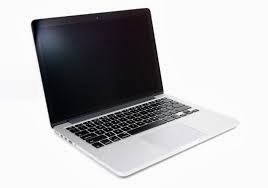
The Mac Book Pro does all the heavy lifting.  It is equipped with Word, Excel, and PowerPoint.  Sometimes as an alternative I also use Apple's Keynote for presentations, and Numbers for spreadsheets.  I connect to the computers at the office via GoToMyPC (more on it later).  I love my Mac computer!  It does everything. The screen is marvelously sharp and bright.  The processor is lightning fast.  I will never run out of hard disk space.  Most importantly the Apple operating system works all the time.  When I am computing on the road I cannot afford the glitches, crashes, and bugs that go along with Microsoft's Windows.  My Mac solves that problem.
The fact of the matter is that I really can practice with just my Mac.  So much is jammed into that machine that I want for nothing.  However, one of the joys of my Moveable Office is still the ability to connect to the PC at my bricks and mortar office in Pleasanton.  For that I love GoToMyPC. I have been using it since it was first released.  For a modest monthly subscription fee I have full access to all of the computing power at my physical office.  All of the people at our firm have the ability to work remotely thanks to GoToMyPC.  It is a fantastic capability to have.

Frequent visitors to this blog will remember that everything at my law firm is converted into digital form.  Adobe Acrobat is a workhorse in our office.  I have a copy installed on my PC at our Pleasanton office, and I also shelled out the extra $400 to install a copy on my Mac.  Every piece of paper is converted to pdf.  Because of the optical character recognition engine in Acrobat every piece of paper is also searchable.  Beyond Acrobat, every phone message/note and email is stored digitally.  Wherever I am anywhere in the world, if there is an internet connection I have access to that stuff via my GoToMyPC remote connection.  Every file in our office is at my disposal.

Banker's Boxes?  No Way!
When I go to trial I don't want to worry about the reliability of internet access, so I just copy the entire electronic matter file and drop it into a dedicated folder on my Mac.  Then I have the ENTIRE client file with me without having to carry a hand truck full of bankers boxes.  Of course I still carry exhibit binders and trial briefs.  However, I foresee a day when even those are eliminated once our family law courts in California get wired.

Almost all of our research is done online (in the cloud if you will).  I just log into my WestLaw Next account and I have an entire law library at my finger tips.  The couple of research programs that we have living on our computers at the office are also available to me thanks to GoToMyPC.  Again, does not matter where I am at.  All I need is an internet connection.  My Moveable Office thus includes a moveable law library.
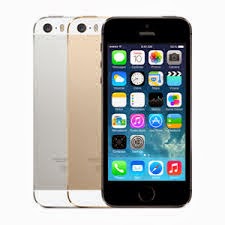
Of course you gotta have a phone and a scanner in the Moveable Office.  Mine is an iPhone 5s.  The calendar and contacts on my phone synchronize with our case management software system at the office.  Full information and thousands of contacts right there on my phone.  I have Acrobat reader installed should I need it.  A copy machine is not necessary in my moveable office.  Instead I use my iPhone (and its built in camera) as a scanner thanks to a great app called Scanner Pro.  From my friends at Readdle, this app rocks.  It is simply the best and easiest to use scanning app out there.  I also have the Hotspot feature enabled on my iPhone.  If WiFi is not available to connect my Mac to the internet, that is not a problem.  I use my iPhone as my computer's connection to the internet (we used to call this tethering in the old days).  With 4G the connection is suitably fast.

Did I mention that I also make phone calls on my phone?  I do.  Phone calls do still take place in law practice.  I like to be handsfree when I talk, but I don't care to be on the speakerphone because it diminishes the audio quality.  I use a Plantronics Voyager Legend headset.  I have tried all of the headset brands out there.  I like the Voyager because it has bluetooth, the over the ear/in the ear design fits well and stays in place, and the boom microphone provides the best audio quality.  Holding the phone to my ear is a nuisance, particularly if I need to check my calendar or review an email during the call.  The headset resolves those problems.

Speaking of phones, we still have desksets at the office.  However, we have converted to internet phones.  We are saving money because of the switch, and adding features to boot.  Our provider is 8x8.  They have an iPhone/iPad app which allows full replication of my office desktop phone on my iPhone. I can answer calls made to my Pleasanton office on my iPhone.  I can retrieve voice mail messages left at my office phone with the iPhone app.  The 8x8 service also provides fax sending and receiving, all of which can also be done on the app.

Regardless of where I am, I prfer fact to face communication.  For face to face conversations with colleagues at the office, we use Skype.  It is also our default text chat tool.  It is always on.  It is free, it is easy to use, and it is reliable.  I do not use Skype for client communications.  I don't like the idea of clients being able to call me anytime via Skype.  It is for in-house use only.  For video conferencing with clients (and also for more advanced conversations with co-workers and colleagues) I use Zoom.  This is another remarkable service.  Through a simple webcam on your computer you get high def, flicker free video and crystal clear sound.  You can schedule meetings in advance, and share screens during the meetings.  I would say that almost a quarter of the face to face meetings that I have now with clients are conducted via Zoom.
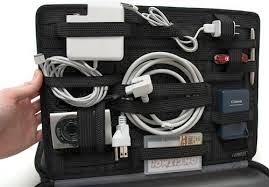

The physical plant for my moveable office? Why it is my handsome Floto leather briefcase.  This bag is the hot-diggity and I challenge anyone to a briefcase swag-off!  Of course mine has my initials branded into it, which makes me even cooler...  To keep all the wires, plugs, headsets, pens, and other stuff neat and tidy I use the GridIt from Cocoon.  The Mac weighs 4.4 pounds.  With the weight of the leather bag, the GritIt, and the accessories that I carry the average weigh in is probably seven to nine pounds.  Not too little, but not too much.  Three pounds can easily be saved by swapping out the Mac for an iPad.

There you have it My Moveable Office!

Please visit hardinglaw.com for more information about Harding & Associates Family Law

#moveableoffice #remotecomputing #telecommuting #Harding&AssociatesFamilyLaw #californiafamilylaw #divorce #family law #superlawyers #americanacademyofmatrimoniallawyers #Pleasantondivorce #AlamedaCountyDivorce #ContraCostaCountyDivorce #lawyers

Wednesday, February 19, 2014

Cloud Based Practice Management Vendor Raises Prices Sky High

Clio is very nice practice management software. It was one of the earliest advocates and adopters of the cloud based platform.  Now comes reason for me to validate my preference for owning and installing certain programs on your own machines rather than hosting in the cloud.  As reported by Robert Ambrogi on his LawSite blog, Clio has raised its monthly subscription price by 47 percent, from $49 per attorney to $72 per attorney.  47%.  Wow!  That is a huge increase.  If you are a subscriber, what are you going to do?  You are going to pay it.  What else can you do?  You don't have the software resident on your computer.  You need it for your practice.  You have no options.

I, on the other hand, own my practice management software.  It is on my server.  And by comparison, the purchase price and the maintenance contract come in under the $72 per month that Clio is now charging.

There are proponents and naysayers for cloud based software, and for hosting your own.  My main point is not to to suggest one is better than the other.  My point is to get you to think before jumping on the cloud bandwagon that software vendors are selling as the greatest thing ever.

Please visit hardinglaw.com for more information about Harding & Associates Family Law

#clio #cloudbased #cloudsware #Harding&AssociatesFamilyLaw #californiafamilylaw #divorce #family law #superlawyers #americanacademyofmatrimoniallawyers #Pleasantondivorce #AlamedaCountyDivorce #ContraCostaCountyDivorce #lawyers

Wednesday, July 17, 2013

Box as an alternative to Dropbox

Dropbox has taken the legal world by storm as the default cloud storage service.  I use the free service, and I love it.  Now Dropbox has some competition, and that competition is specifically targeting us lawyers.

box.com is another cloud storage service.  It is gaining users, and it is gaining fans in its competition with Dropbox. At his LawSites blog legal technology and marketing expert Robert Ambrogi compares the two products, and casts his vote in favor of box.  Robert's post is filled with comparisons, and reasons why he thinks box is better.  Check it out by clicking here.

Please visit hardinglaw.com for more information about Harding & Associates Family Law 

#Harding&AssociatesFamilyLaw #californiafamilylaw #divorce #family law #superlawyers #americanacademyofmatrimoniallawyers #Pleasantondivorce #AlamedaCountyDivorce #ContraCostaCountyDivorce #lawyers

Wednesday, August 29, 2012

Two Step Authentication For Dropbox

If you hadn't heard, Dropbox got hacked recently.  To be more precise hackers found a security vulnerability in the cloud storage service by which they could sneek into and peek around user accounts (so the users got hacked).  In response Dropbox has implemented an optional two step security protocol.The setup however can be a bit tricky. 

Thanks to the folks at DocumentSnap.com for putting a tutorial up.

Click here for the step by step instructions.

Please visit hardinglaw.com for more information about Harding & Associates Family Law 

#Harding&AssociatesFamilyLaw #californiafamilylaw #divorce #family law #superlawyers #americanacademyofmatrimoniallawyers #Pleasantondivorce #AlamedaCountyDivorce #ContraCostaCountyDivorce #lawyers

Thursday, April 26, 2012

Google Drive On The Horizon

Google is set to launch its new Google Drive product. From what I can tell it is going to be a cloud based file storage and collaboration tool similar to Dropbox and Box.  What intrigues me about Drive is its favorite apps feature.  According to Google you will be able to "create, open and share files from a variety of apps directly in Google Drive." And you will be able to "open over 30 file types right in your browser—including HD video, Adobe Illustrator and Photoshop—even if you don’t have the program installed on your computer."  Does that mean I can open and edit a PowerPoint on my iPad?  Read pdf's without a viewer app?  Read and write Word docs\?  The inference would be yes.  And that would be a nice gadget enhancer!

The exact release date is not out.  You can log in to your Google account and request that a notice be sent when it is available.  Sounds positive.  We will have to keep an eye on it.

Please visit hardinglaw.com for more information about Harding & Associates Family Law 

#Harding&AssociatesFamilyLaw #californiafamilylaw #divorce #family law #superlawyers #americanacademyofmatrimoniallawyers #Pleasantondivorce #AlamedaCountyDivorce #ContraCostaCountyDivorce #lawyers

Friday, February 17, 2012

Ted Brooks On Cloud Storage

Want to learn more about Cloud storage? Legal technologist Ted Brooks reviews the most popular cloud storage services on his Court Technology and Trial Presentation Blog. Check out Ted's loves and hates regarding Dropbox, You SendIt, Box, Google Docs, and iCloud. This article will go a long way in helping you to understand what cloud storage is, and which product will best suit your needs. Click here for the read.

Please visit hardinglaw.com for more information about Harding & Associates Family Law

#Harding&AssociatesFamilyLaw #californiafamilylaw #divorce #family law #superlawyers #americanacademyofmatrimoniallawyers #Pleasantondivorce #AlamedaCountyDivorce #ContraCostaCountyDivorce #lawyers

Solo nets Supreme Court win!

I know this has nothing to do with technology, but I think it is pretty cool. Andrew Simpson is a sole practitioner in the U.S. Virgin Is...