Showing posts with label Apps. Show all posts

Wednesday, April 19, 2017

Mindfulness and Balance

Today I write to you about meditation. What does meditation have to do with technology and law practice? Quite a bit thank you. Let me elaborate.

About a year ago I was having dinner with another family law lawyer as part of a dine around program at a CLE conference. He is a long time friend, and as friends do we talked about law, our lives, our families, etc. Eventually we got to the topic of stress, and how much of it there is in a family law practice. As we were talking about stress, my mood went down. My buddy's mood stayed high. I asked him how he was able to keep his spirits up even though we were each sharing some real stress stories with one another? He explained that he had begun meditating...

Meditation, really? I responded. Here is where the technology comes in. He explained that he had downloaded an app to his phone, and that everyday he was dong his app-based meditation. That it was really helping him to manage the stress in his life, and that I should give it a go.

Stress, stress, stress!  Anxiety, anxiety, anxiety! Frustration, frustration, frustration! As family law lawyers it is there.

My curiosity piqued, I began researching the topic of mediation, and methods of doing it. Here is the family law practice part. The virtues of meditation have been extolled for thousands of years. I had just never given it much thought. But the more I researched, the more impressed I became with the asserted physical and mental health benefits. Wouldn't we all be better family law practitioners if we could manage our stress and anxiety more effectively?

I tried a slew of different iPhone apps. Glenn Harrold has become a favorite. The really life changer for me though is an app/website called Headspace. A subscription service, Headspace has an app for smart phones, and a very nice website. Now I am going to pirate from that website.

www.headspace.com
On your mobile and tablet, you can listen to Headspace on the go and download sessions to use offline. On your computer, you can play any session, any time. The techniques used within the Headspace app have been refined and developed over many centuries, passed down from teacher to student. The intention of these techniques is to cultivate awareness and compassion so that we might better understand the mind, as well as our relationship with the world around us. With this as our focus, we view any kind of health benefit beyond the development of awareness and compassion as a helpful byproduct or positive side-effect of regular meditation.

Headspace has single sessions and series sessions focusing on sleep, stress, anxiety, sports, health, relationships, performance, and on and on. You get comfortable, put your headphones on, and listen to the guided meditation sessions. You set the length of the session you want at 10, 15, 30 minutes, and go through it work-free.

For me this stuff absolutely works! The programs are guided programs. Andy Puddicombe, one of the founders of Headspace and the person who narrates the programs, does all of the work for you. I don't have to struggle to learn mediation. It is fed to me by the app. That I love. I also love feeling better, having more energy, and having a clearer mind. I am definitely a believer.

I get it. It is easy to be a skeptic. I was. Then I gave it a try. I am better off for it. If it works for me, I am sure it can work for you. Give it a try. What have you got to lose other than stress and anxiety!

Please visit hardinglaw.com for more information about Harding & Associates Family Law 

#Harding&AssociatesFamilyLaw #californiafamilylaw #divorce #family law #superlawyers #americanacademyofmatrimoniallawyers #Pleasantondivorce #AlamedaCountyDivorce #ContraCostaCountyDivorce #lawyers

Tuesday, March 28, 2017

Tech Tips from the Tech Show


I have never had the good fortune of attending the ABA's Tech Show. I hear it is awesome. The calendaring of the event just never seems to synch with my schedule -- although I will keep trying to make it happen...

attorneyatwork.com
Over at attorneyatwork.com there is a great post featuring tips and takeaways from this year's Tech Show. Sharon Nelson, John Simek, Jim Calloway, Deborah Savadra, Natalie Kelly, Darla Jackson, Tom Lambotte, Reid Traut, and Nora Regis share their favorite tips gleaned from the program. Apps, tricks, shortcuts, and program reviews are all mentioned.

Please click here for this very informative read.

Please visit hardinglaw.com for more information about Harding & Associates Family Law 

#abatechshow2017 #attorneyatwork #Harding&AssociatesFamilyLaw #californiafamilylaw #divorce #family law #superlawyers #americanacademyofmatrimoniallawyers #Pleasantondivorce #AlamedaCountyDivorce #ContraCostaCountyDivorce #lawyers

Friday, January 20, 2017

Our Family Wizard

I am a huge fan of the website, app and co-parenting tools from Our Family Wizard. I recommend OFW to anyone and everyone who will listen. Recently my OFW account rep, Matthew Havrevold, stopped by the office to catch up. As I am want to do, I exploited the opportunity and asked Matt to send me some content for the blog. Of course, he was happy to comply!  Here is what Matt would like you to consider:

Since 2001, the OurFamilyWizard® web and mobile applications have helped co-parents to reduce conflict and attain more accurate and organized communication records. The platform was expressly designed to get co-parents to communicate clearly without being sidetracked by conflict. It does so by providing a variety of features for organizing information while making it all accessible from one central location. While some co-parent communication tools only facilitate messaging, the OurFamilyWizard® website offers a full suite of tools to help parents create parenting schedules, log expenses, send reimbursements, and share important family information.  
Family courts in all 50 states and across Canada recognize the benefits to parents using these tools and consistently order their use in contested cases. More than just benefitting parents, the OurFamilyWizard® toolset also makes it easy for professionals to work with clients. OFW® Professional Access provides a way to oversee parent activity and access court-ready reports at no cost. All entries are recorded indefinitely, and every message is time stamped when sent and first read. Unlike email or text messages, there is no risk of losing parent activity or questioning whether something was received. Counsel can quickly access client information straight from a computer or iPad using the free OFW® app built for professionals. 
With both web and mobile access to these tools, parents and professionals can access and share information at home, at the office, or on the go. This makes it easier to handle family-related matters in real time. For instance, a parent doesn't have to wait to get home from the pediatrician's office to share details about the appointment. While waiting for the appointment to wrap up, a parent can use the OFW® mobile app to quickly upload a photo of the receipt to request reimbursement from the other parent. The other parent can access that request, view the receipt, then transfer the funds to the other parent via OFWpay™ in just the click of a button. For professionals using OFW®, there is no longer a need for clients to forward loads of emails to their attorneys and other professionals. When all client communication is accessible in one central location, a professional can find the important details they need to help their client without wasting time weeding through frivolous correspondence.
The website's features are built for parents to intuitively convey information without the need for back and forth messaging. Even so, the OFW® message board provides a space for parents to send secure messages while also providing feedback to parents about the tone of the message. Developed to go against eight levels of connotative feeling, Tonemeter™ will analyze a new message while a parent composes it and flag any emotionally charged phrases it detects. This gives the parent a chance to reframe the tone of their message before sending.   

While other web-based tools only offer a messaging feature for parents and no access to professionals, the OurFamilyWizard® features not only improve clarity between co-parents but also makes it easier for counsel to work with clients effectively. An OurFamilyWizard® subscription gives a parent complete access to all these tools plus mobile apps and detailed reports. Discounted or free subscriptions are offered to those who quality. Additionally, OFW® Professional Access is always free and includes access to link with clients, create new families, create clear reports, iPad app access, and more. 


If you are not utilizing OFW in your practice, or failing to recommend it to your clients, you are really shorting your practice. Check it out. Give Matt a call and request more information. You will be impressed.

Please visit hardinglaw.com for more information about Harding & Associates Family Law

#ourfamilywizard #Harding&AssociatesFamilyLaw #californiafamilylaw #divorce #family law #superlawyers #americanacademyofmatrimoniallawyers #Pleasantondivorce #AlamedaCountyDivorce #ContraCostaCountyDivorce #lawyers

Monday, March 7, 2016

A Website For Support Payments


Supportpay.com is a pretty nifty web portal that assists parents with their child support obligations. As the folks at Supportpay.com explain it, child support is not just a single monthly payment but also a broad collection of shared expenses. Parents must continually manage, communicate and negotiate over child related expenses. The entire process is complex, time consuming and very stressful. Supportpay seeks to eliminate child support conflict and enable collaboration with an easy to use online application, providing both parents transparency while saving time & money. Parents can now spend less time managing child support and more time focused on raising happy, healthy children.

Sounds pretty good to me! Here's how it works:


There is a free version, a Premium version at $14.99 per month, and a Lawyer version at $19.99 per month (discounts available if you pay for a year in advance). At the Premium level you get the ability to enter transactions from your mobile device or computer; attach receipts; historical tracking; scheduling of base support; wage assignment tracking; and dispute items.  The Lawyer version gets you that plus certified documents for court filings and Certified reports for taxes; and a back door for the lawyer to go in and review (without being able to make changes).


I would love to hear from folks that are using the service!  Send in your comments!

Please visit hardinglaw.com for more information about Harding & Associates Family Law


#supportpay #Harding&AssociatesFamilyLaw #californiafamilylaw #divorce #family law #superlawyers #americanacademyofmatrimoniallawyers #Pleasantondivorce #AlamedaCountyDivorce #ContraCostaCountyDivorce #lawyers

Sunday, February 21, 2016

I Just Switched To LogMeIn

I have been remote computing for more than 20 years. Having the ability to operate my office computer 24/7 from anywhere in the world (or at least anywhere that I have internet connectivity or a cell phone signal) is a huge quality of life and quality of practice benefit. I have spread the word on remote computing in articles and presentations for decades. For many of those 20 years my service of choice has been GoToMyPC. I have always loved it, and enthusiastically endorsed it.

Recently the performance of my GoToMyPC account has been deteriorating. Connections have been slow, interruptions have been frequent. Disconnections have been happening with shocking frequency. The problems were significant enough that I began testing other options. Microsoft Windows has its own resident remote desktop feature. I quickly eliminated it because it will not work with the multiple monitors I have on my office computer. Also, I wanted an app that was Mac friendly (rather than having to run it exclusively through the Parallels Windows virtualization software that I have on my Mac). I tried Splashtop. It was okay, but not great. The refresh rate lagged, and the screen resolution was fuzzy.

Next I tried LogMeIn. I was familiar with the product, having used it on a trial basis when it first came out years ago. At that time it was inferior to GoToMyPC, so I moved away from it. My how it has improved. I gave it a hearty test drive this weekend. I appreciate the improved layout of the program. It connects fast. It runs fast and steady. It's smooth. The screen resolution is sharper than any of the competitors. It looks good. It has a multi-screen feature. For me it runs better than the other options I have tried, particularly on my Mac. The Pro version for two computers runs $149 per year. That price is nominal relative to the convenience and utility the service provides. I have made the switch to LogMeIn.

Please visit hardinglaw.com for more information about Harding & Associates Family Law 

#LogMeIn #Harding&AssociatesFamilyLaw #californiafamilylaw #divorce #family law #superlawyers #americanacademyofmatrimoniallawyers #Pleasantondivorce #AlamedaCountyDivorce #ContraCostaCountyDivorce #lawyers

Monday, February 15, 2016

Evernote Alternatives

I love Evernote. I use it everyday. Unfortunately there are concerning rumors out there. Funding is down. Revenue is down. Longevity is in question. If you are looking for an alternative, they exist.
Lawyerist.com

Lawyerist.com has a great article on other products you may wish to consider.  Click here to check it out.

Please visit hardinglaw.com for more information about Harding & Associates Family Law

#Evernote #Lawyerist #Harding&AssociatesFamilyLaw #californiafamilylaw #divorce #family law #superlawyers #americanacademyofmatrimoniallawyers #Pleasantondivorce #AlamedaCountyDivorce #ContraCostaCountyDivorce #lawyers

Sunday, December 20, 2015

How About A Chat, Interview, Rountable, Forum . . . .

Time to share some tips folks.  Mine is ReplyAll.  A free service that let's you host chat conversations, and then post them as content on your blog or website.  You can check it out below. Go ahead and post your tip so that the conversation can grow, and our colleagues can learn some new stuff!


Please visit hardinglaw.com for more information about Harding & Associates Family Law #replyall #Harding&AssociatesFamilyLaw #californiafamilylaw #divorce #family law #superlawyers #americanacademyofmatrimoniallawyers #Pleasantondivorce #AlamedaCountyDivorce #ContraCostaCountyDivorce #lawyers

Tuesday, August 4, 2015

2015 Best Apps List

The Cyber Advocate has released its list of the best apps for 2015. Complete with iOS and Android app reviews, the Cyber Advocate list brings a lot of solid info for those of us looking to expand our app collections. The list is not focused on lawyers, but then again sometimes it is good to stray beyond the lines and have a little fun.  The new Star Wars app for instance? It is 4th on the Cyber Advocate list.

Check out the complete list by clicking here.

Please visit hardinglaw.com for more information about Harding & Associates Family Law

#cyberadvocate #bestapps #Harding&AssociatesFamilyLaw #californiafamilylaw #divorce #family law #superlawyers #americanacademyofmatrimoniallawyers #Pleasantondivorce #AlamedaCountyDivorce #ContraCostaCountyDivorce #lawyers

Friday, May 29, 2015

Very Impressive iPad Trial App

TabLit Applications has relesed its TabLit: Trial Notebook app for the iPad.  I must admit, from what I have seen it looks pretty darn good. Full disclosure, since I am no longer using an iPad in court I have not purchased the app (particularly with a $90 price point). But reviews from actual users are positive and see no reason to misconstrue the product representations.  For example, the app hass:

  • Multiple levels of customizable tabs for full trial organization.
  • Pop-up windows for case notes, witness information all at your fingertips.
  • Examination outlines in true outline format, Q&A format and more...
  • Evidence checklist with witness cross-reference to examination outlines.
  • Evidentiary issue cross-reference to arguments and rules of evidence.
  • Evidence repository with photo interface for documentary and physical evidence.
  • Examination outlines
  • Examination checklists
  • Contacts list

Heck, I wish this app was available for the MacBook Pro that I do take to court. Take a look at these screen shots.


Want to learn more, please click here.

Please visit hardinglaw.com for more information about Harding & Associates Family Law

#ipad #trialapp #Harding&AssociatesFamilyLaw #californiafamilylaw #divorce #family law #superlawyers #americanacademyofmatrimoniallawyers #Pleasantondivorce #AlamedaCountyDivorce #ContraCostaCountyDivorce #lawyers

Wednesday, July 2, 2014

Scanner Pro

Over at The Mac Lawyer my friend Ben Stevens has a great post about the Scanner Pro app.  He also lets us know that it is on sale!  Click here for a look.

In my opinion, and Ben's, Scanner Pro is simply the best scanning app out there. Truly a great app!  If you ever need to do any scanning with your device, you need Scanner Pro.

Please visit hardinglaw.com for more information about Harding & Associates Family Law 


#ScannerPro #TheMacLawyer #BenStevens #Harding&AssociatesFamilyLaw #californiafamilylaw #divorce #family law #superlawyers #americanacademyofmatrimoniallawyers #Pleasantondivorce #AlamedaCountyDivorce #ContraCostaCountyDivorce #lawyers

Tuesday, May 13, 2014

Attorney Smartphone Use and Android By The Numbers


Please visit hardinglaw.com for more information about Harding & Associates Family Law 

#Android #Harding&AssociatesFamilyLaw #californiafamilylaw #divorce #family law #superlawyers #americanacademyofmatrimoniallawyers #Pleasantondivorce #AlamedaCountyDivorce #ContraCostaCountyDivorce #lawyers

Wednesday, April 30, 2014

How To Find Your Lost iPhone or iPad

If you are a lawyer carrying an iPhone or an iPad, it is likely that device is jammed with important and confidential information.  What happens if you misplace that devise, with all of that important information?

Fortunately Apple has thought of such an unpleasant event, and the iOS operating system has built in security measures.  You can track your lost device, or you can remotely sweep its contents clean (a super erase if you will). However, for those measures to be available to you, you have to set them up on the device, and you need to know how to utilize them.

For an education on this topic we turn to our friends at Apple Tool Box.com.  The hardworking folks at ATB have posted a step-by-step tutorial on how to program your device in anticipation of its being lost, and on what to do when it is lost.  It couldn't be simpler.  Click here to learn how.

Please visit hardinglaw.com for more information about Harding & Associates Family Law 

#lostiphone #lostipad #Harding&AssociatesFamilyLaw #californiafamilylaw #divorce #family law #superlawyers #americanacademyofmatrimoniallawyers #Pleasantondivorce #AlamedaCountyDivorce #ContraCostaCountyDivorce #lawyers

Thursday, March 6, 2014

A Moveable Office

I consider myself a true road warrior.  It all started more than eighteen years ago when I wanted to work from home so I could be around our newborn baby boy.  I have been telecommuting, remote computing, and practicing mobile from the beginning of those technological times. Who else out there can remember connecting two computers via telephone modems and pcAnywhere software?  Who else amongst us used the first generation of Paperport?  How about memories of carrying a 12 pound laptop computer around?  My memories go back even farther than that.
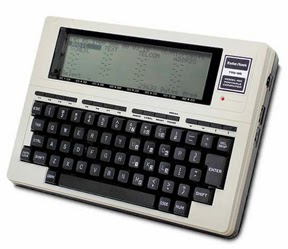
Think I am kidding?  Look at the first notebook computer I actually used in college.  To the right you see a Radio Shack TRS-80 Model 100.  It had about enough memory on board to save about a quarter of a page worth of information.  Beyond that storage was on a cassette tape drive.  I actually wrote term papers with that thing in 1984!  It retailed for about a $1000.  The only way I could afford it is because I had a buddy who worked at Radio Shack and he bought it for me with his deep, deep employee discount.
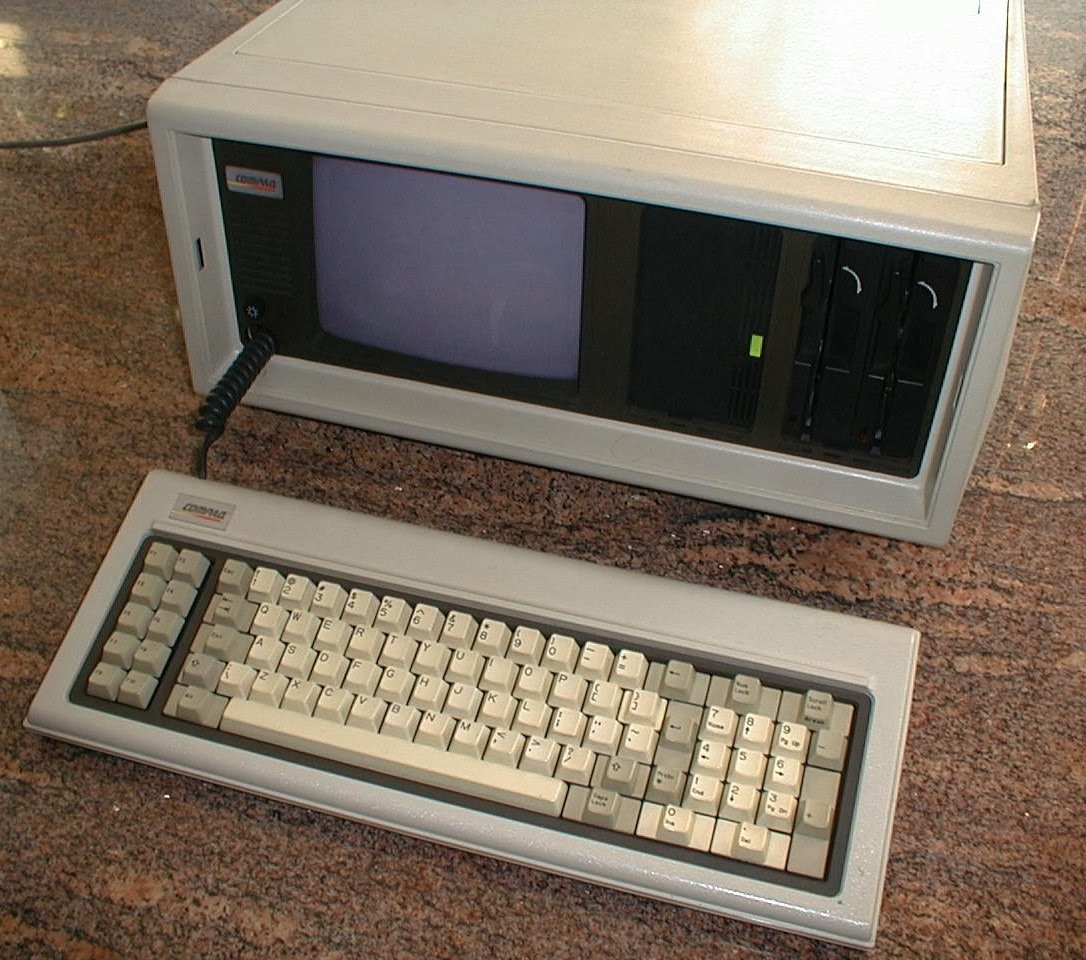
My college roommate was a computer science major, and
the portable computer he used was even worse.  Anybody remember the Compaq "Suitcase" Portable.  We ate on the floor because that beauty took up our entire kitchen table.

Of course technology evolves.  Thankfully so!  I have used it all. Smartphones, laptops, notebooks . . .

I am now down to two pieces of hardware that comprise my moveable office.  It no longer includes an iPad because my eyes are too bad to read the small screen without reading glasses.  Plus I found the small screen and finger navigation to be a handicap when I was trying to find, open, and work with documents in trial.  I can do all of the same stuff with my iPhone, and since I have to put the glasses on regardless, I have moved away from the iPad.  That having been said, I still feel that the iPad is a revolutionary, stunning, remarkable, invaluable piece of technology.  Everything that I say and do re my Mac Book Pro, below, can be done with an iPad.

What I do carry are my iPhone 5s and a Mac Book Pro Retina.
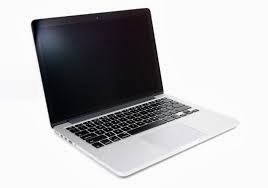
The Mac Book Pro does all the heavy lifting.  It is equipped with Word, Excel, and PowerPoint.  Sometimes as an alternative I also use Apple's Keynote for presentations, and Numbers for spreadsheets.  I connect to the computers at the office via GoToMyPC (more on it later).  I love my Mac computer!  It does everything. The screen is marvelously sharp and bright.  The processor is lightning fast.  I will never run out of hard disk space.  Most importantly the Apple operating system works all the time.  When I am computing on the road I cannot afford the glitches, crashes, and bugs that go along with Microsoft's Windows.  My Mac solves that problem.

The fact of the matter is that I really can practice with just my Mac.  So much is jammed into that machine that I want for nothing.  However, one of the joys of my Moveable Office is still the ability to connect to the PC at my bricks and mortar office in Pleasanton.  For that I love GoToMyPC. I have been using it since it was first released.  For a modest monthly subscription fee I have full access to all of the computing power at my physical office.  All of the people at our firm have the ability to work remotely thanks to GoToMyPC.  It is a fantastic capability to have.

Frequent visitors to this blog will remember that everything at my law firm is converted into digital form.  Adobe Acrobat is a workhorse in our office.  I have a copy installed on my PC at our Pleasanton office, and I also shelled out the extra $400 to install a copy on my Mac.  Every piece of paper is converted to pdf.  Because of the optical character recognition engine in Acrobat every piece of paper is also searchable.  Beyond Acrobat, every phone message/note and email is stored digitally.  Wherever I am anywhere in the world, if there is an internet connection I have access to that stuff via my GoToMyPC remote connection.  Every file in our office is at my disposal.
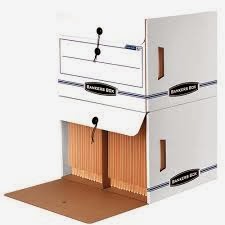
Banker's Boxes?  No Way!
When I go to trial I don't want to worry about the reliability of internet access, so I just copy the entire electronic matter file and drop it into a dedicated folder on my Mac.  Then I have the ENTIRE client file with me without having to carry a hand truck full of bankers boxes.  Of course I still carry exhibit binders and trial briefs.  However, I foresee a day when even those are eliminated once our family law courts in California get wired.

Almost all of our research is done online (in the cloud if you will).  I just log into my WestLaw Next account and I have an entire law library at my finger tips.  The couple of research programs that we have living on our computers at the office are also available to me thanks to GoToMyPC.  Again, does not matter where I am at.  All I need is an internet connection.  My Moveable Office thus includes a moveable law library.
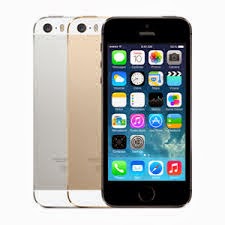
Of course you gotta have a phone and a scanner in the Moveable Office.  Mine is an iPhone 5s.  The calendar and contacts on my phone synchronize with our case management software system at the office.  Full information and thousands of contacts right there on my phone.  I have Acrobat reader installed should I need it.  A copy machine is not necessary in my moveable office.  Instead I use my iPhone (and its built in camera) as a scanner thanks to a great app called Scanner Pro.  From my friends at Readdle, this app rocks.  It is simply the best and easiest to use scanning app out there.  I also have the Hotspot feature enabled on my iPhone.  If WiFi is not available to connect my Mac to the internet, that is not a problem.  I use my iPhone as my computer's connection to the internet (we used to call this tethering in the old days).  With 4G the connection is suitably fast.
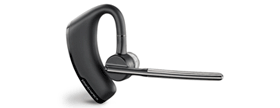
Did I mention that I also make phone calls on my phone?  I do.  Phone calls do still take place in law practice.  I like to be handsfree when I talk, but I don't care to be on the speakerphone because it diminishes the audio quality.  I use a Plantronics Voyager Legend headset.  I have tried all of the headset brands out there.  I like the Voyager because it has bluetooth, the over the ear/in the ear design fits well and stays in place, and the boom microphone provides the best audio quality.  Holding the phone to my ear is a nuisance, particularly if I need to check my calendar or review an email during the call.  The headset resolves those problems.

Speaking of phones, we still have desksets at the office.  However, we have converted to internet phones.  We are saving money because of the switch, and adding features to boot.  Our provider is 8x8.  They have an iPhone/iPad app which allows full replication of my office desktop phone on my iPhone. I can answer calls made to my Pleasanton office on my iPhone.  I can retrieve voice mail messages left at my office phone with the iPhone app.  The 8x8 service also provides fax sending and receiving, all of which can also be done on the app.

Regardless of where I am, I prfer fact to face communication.  For face to face conversations with colleagues at the office, we use Skype.  It is also our default text chat tool.  It is always on.  It is free, it is easy to use, and it is reliable.  I do not use Skype for client communications.  I don't like the idea of clients being able to call me anytime via Skype.  It is for in-house use only.  For video conferencing with clients (and also for more advanced conversations with co-workers and colleagues) I use Zoom.  This is another remarkable service.  Through a simple webcam on your computer you get high def, flicker free video and crystal clear sound.  You can schedule meetings in advance, and share screens during the meetings.  I would say that almost a quarter of the face to face meetings that I have now with clients are conducted via Zoom.
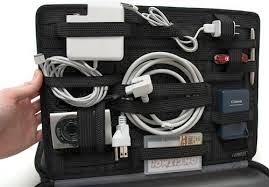

The physical plant for my moveable office? Why it is my handsome Floto leather briefcase.  This bag is the hot-diggity and I challenge anyone to a briefcase swag-off!  Of course mine has my initials branded into it, which makes me even cooler...  To keep all the wires, plugs, headsets, pens, and other stuff neat and tidy I use the GridIt from Cocoon.  The Mac weighs 4.4 pounds.  With the weight of the leather bag, the GritIt, and the accessories that I carry the average weigh in is probably seven to nine pounds.  Not too little, but not too much.  Three pounds can easily be saved by swapping out the Mac for an iPad.

There you have it My Moveable Office!

Please visit hardinglaw.com for more information about Harding & Associates Family Law

#moveableoffice #remotecomputing #telecommuting #Harding&AssociatesFamilyLaw #californiafamilylaw #divorce #family law #superlawyers #americanacademyofmatrimoniallawyers #Pleasantondivorce #AlamedaCountyDivorce #ContraCostaCountyDivorce #lawyers

Wednesday, February 26, 2014

Take A Peek At This

Peek is a new calendar app for the iPhone.  I am using it, and I am liking it.  A bit of the back story.  I like the resident calendar on my iPhone just fine.  However, there are times when the small type, and my fat fingers, can be a challenge.  Scrolling through the day, and adding and deleting events can sometimes be befuddling.


I have rolled through a host of alternative calendar apps, without much luck.  Until Peek. 


I spent the $1.99 and gave it a launch.  I have been pleasantly surprised.  Peek is just what I need.  A stripped down app that delivers the basics in a bigger size and with simpler controls.  If I want to see en entire day I can.  If I want to add or delete events I give a simple swipe and then get nice big buttons to do so. 


Peek is not an overblown, bells and whistles app.  It syncs perfectly with my iPhone calendar.  No set up.  No programming.  Just click and go. That is why I like it.


 Peek is in the Apple App Store

Please visit hardinglaw.com for more information about Harding & Associates Family Law


#Harding&AssociatesFamilyLaw #californiafamilylaw #divorce #family law #superlawyers#americanacademyofmatrimoniallawyers #internationalacademyofmatrimoniallawyers #Pleasantondivorce #AlamedaCountyDivorce #ContraCostaCountyDivorce #lawyers

Wednesday, February 19, 2014

Cloud Based Practice Management Vendor Raises Prices Sky High

Clio is very nice practice management software. It was one of the earliest advocates and adopters of the cloud based platform.  Now comes reason for me to validate my preference for owning and installing certain programs on your own machines rather than hosting in the cloud.  As reported by Robert Ambrogi on his LawSite blog, Clio has raised its monthly subscription price by 47 percent, from $49 per attorney to $72 per attorney.  47%.  Wow!  That is a huge increase.  If you are a subscriber, what are you going to do?  You are going to pay it.  What else can you do?  You don't have the software resident on your computer.  You need it for your practice.  You have no options.

I, on the other hand, own my practice management software.  It is on my server.  And by comparison, the purchase price and the maintenance contract come in under the $72 per month that Clio is now charging.

There are proponents and naysayers for cloud based software, and for hosting your own.  My main point is not to to suggest one is better than the other.  My point is to get you to think before jumping on the cloud bandwagon that software vendors are selling as the greatest thing ever.

Please visit hardinglaw.com for more information about Harding & Associates Family Law

#clio #cloudbased #cloudsware #Harding&AssociatesFamilyLaw #californiafamilylaw #divorce #family law #superlawyers #americanacademyofmatrimoniallawyers #Pleasantondivorce #AlamedaCountyDivorce #ContraCostaCountyDivorce #lawyers

Thursday, February 6, 2014

Evernote Help Wanted

Evernote is a software technology with a fervent following.  Adopters love it.  Here is where I need help.  What is so great about this program?  In particular, why is it great for lawyers?  I have Outllook which manages my email just fine.  I have AbacusLaw to manage my calendar, my to dos, and my case management.  What else could I possibly need?  And if there is something else that I need, how can Evernote deliver it to me in a superior way?

I am not saying Evernote is not great.  It very well could be, I just don't know how.  Hey ABA, how about a Evernote In One Hour For Lawyers book . . .

If you are an Evernote lover educate me.  Leaves your comments and tips!

Please visit hardinglaw.com for more information about Harding & Associates Family Law 

#evernote #Harding&AssociatesFamilyLaw #californiafamilylaw #divorce #family law #superlawyers #americanacademyofmatrimoniallawyers #Pleasantondivorce #AlamedaCountyDivorce #ContraCostaCountyDivorce #lawyers

Wednesday, January 22, 2014

This Would Be A Cool Smart Watch

Smart watches are the next big thing in mobile technology.  Think of an iPhone miniaturized and strapped to your wrist. Not only will smart watches tell time, they will also be phones, calendars, viewers, the whole shabang!  I am not sure how my old eyes will ever be able to see anything on them, but that is a different issue.

There are already a few on the market (Pebble, Sony, Pine) but their technology is infantile.  As with all things tech though, new prototypes are coming out all the time.  One of the coolest designs I have seen is from Todd Hamilton. Now, of course, these models are just that, models. No real hardware exists yet, but Hamilton's designs give us a flashy example of just how cool the smart watch idea can be.

Check out more of Todd's cool designs and ideas by visiting his blog.

Please visit hardinglaw.com for more information about Harding & Associates Family Law 

#smartwatch #Harding&AssociatesFamilyLaw #californiafamilylaw #divorce #family law #superlawyers #americanacademyofmatrimoniallawyers #Pleasantondivorce #AlamedaCountyDivorce #ContraCostaCountyDivorce #lawyers

Saturday, January 18, 2014

PowerPoint Presentations On Your iPad


The iPad is a nifty tool for making presentations.  I am a big fan of Apple's Keynote presentation software (for Macs and iPads).  Others prefer to stick with the tried and true PowerPoint from Microsoft.  Fortunately, if you are an Apple hardware person wanting to use PowerPoint, you can have your cake and eat it to.

Over at the ABA's Law Technology Today blog there are a series of articles detailing how you can give PowerPoint presentations on you iPad.  Click here for a look.

Please visit hardinglaw.com for more information about Harding & Associates Family Law #keynote powerpoint


#powerpointonipad #Harding&AssociatesFamilyLaw #californiafamilylaw #divorce #family law #superlawyers #americanacademyofmatrimoniallawyers
#Pleasantondivorce #AlamedaCountyDivorce #ContraCostaCountyDivorce #lawyers

Thursday, September 5, 2013

Mobile Websites

Do you have a website or blog for your practice?  If you do you have likely heard of the latest rage, which is sites optimized for viewing on mobile devices.  Beware the snake oil salesman!  It is true that  website and blog viewing on mobile devices is way up.  You want folks to be able to view your sites on their devices. That does not mean that you have to go out and spend hundreds or thousands of dollars on a second site designed just for mobile devices.  The web design sales folks will tell you that you do.  I am here to tell you that you don't.  In many instances the push for sites designed specially for mobile devices is just a marketing ploy.

But how do you know?  First off, look at your website or blog on a mobile device.  How does it look?  Can you read it?  Can you see the graphics.  If the answers are yes and yes, your site is already mobile ready. What most mobile website designers do is simply remove the graphics from your site, strip it down to nothing more than an textual outline, and then sell it as something special for mobile devices.  You could end up paying more for less.

Need to assess your site even deeper? Identify the software used to create your website or blog.  Chances are it is already designed to accomplish the cross-over between desktop devices and mobile devices.  I write this Family Law Layer Tech & Practice blog utilizing Google's Blogger software.

If you are reading this on a pc or mac, it looks different than it does if you are looking at it on a smartphone. The smartphone version you see to the right is more stripped down. Content is king, rather than graphics, on the smartphone version so that it can load quickly.

Compare the mobile version to the full-blown computer version you see below. More pictures, more graphics.  More sophisticated layout.

Want to know what I do to make this happen?  Absolutely nothing! The Blogger software does it all for me.  It creates two blogs.  I go to my dashboard and post a new entry and that is it.  Blogger shows readers one version for computers (with all the bells and whistles) and another version for smartphone readers.  I have nothing to do with it!


Same thing with the www.hardinglaw.com website for my law firm.  That site is built on the WordPress platform.  Whether you are viewing it on a computer or a mobile device, you are going to see the same thing. The only difference is that the initial view on a smartphone is going to be smaller than the view on a computer.  Spread two fingers on your smartphone screen and the images zooms so that you can see them up close.  All of the major design software products accomplish the same cross-over.  No second website to create or maintain.  No duplicate cost. No loss of presence or impact.

www.hardinglaw.com

If you want to increase your web design expenses by building a special mobile site, go for it.  Just don't do it because a salesman tell you that you have to.

Please visit hardinglaw.com for more information about Harding & Associates Family Law #Harding&AssociatesFamilyLaw #californiafamilylaw #divorce #family law #superlawyers #americanacademyofmatrimoniallawyers #Pleasantondivorce #AlamedaCountyDivorce #ContraCostaCountyDivorce #lawyers

Solo nets Supreme Court win!

I know this has nothing to do with technology, but I think it is pretty cool. Andrew Simpson is a sole practitioner in the U.S. Virgin Is...